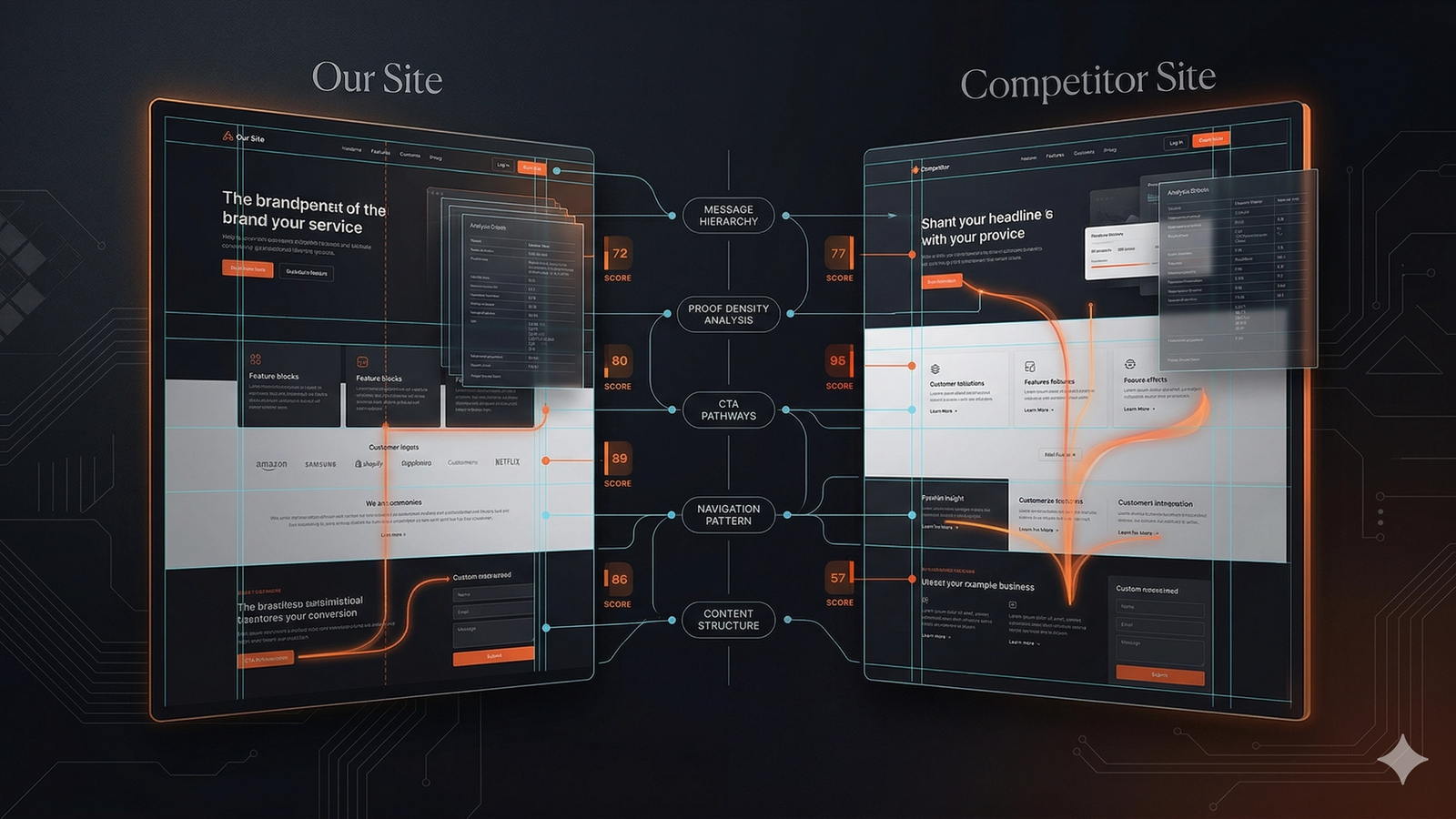
A structured competitor comparison before a redesign prevents costly mistakes based on subjective opinions. This workflow focuses on diagnosing real gaps instead of just changing visuals. The process involves picking one competitor and buyer job, inventorying pages, then comparing messaging, information architecture, social proof, conversion paths, content depth, and mobile UX. The output is a scorecard that separates copy, UX, and visual problems, leading to a strategic redesign plan that prioritizes fixing core issues before updating aesthetics. This evidence-based approach ensures the new site performs better, not just looks different.
Most redesign projects begin with opinions that sound urgent and expensive.
"We look dated."
"Their site feels sharper."
"Our homepage is not premium enough."
These comments aren't always wrong. They're just incomplete.
Before a redesign, the better question isn’t whether a competitor looks better. It’s whether they communicate, route, prove, and convert better for the same buyer. That investigation is smarter—and cheaper.
If you want a hands-on environment for this comparison, SavageAudit's compare websites tool is built for it. Use this workflow to separate real website gaps from subjective design opinions before a redesign turns into a taste contest.
Why competitor comparison matters before a redesign
Redesigns fail when teams change the paint without diagnosing the leak.
Sometimes the problem is visual credibility. Other times it’s weak proof, confusing navigation, a broken mobile flow, or a message that misses the mark. Without a structured comparison against a live alternative, you risk solving the wrong problem with an expensive design cycle.
A useful competitor comparison does three things:
- Shows what the competitor is doing better.
- Shows what they are doing worse.
- Turns those differences into redesign priorities, not just inspiration-board noise.
Step 1: Pick one competitor and one buyer job
Don't start by comparing your site against eight competitors at once.
Choose one direct competitor and one specific buyer job.
Examples:
- Evaluate homepage audit tools
- Compare SaaS demo page optimization services
- Shortlist full-site audit providers
- Find a website comparison workflow before a redesign
If you compare everything at once, the exercise gets vague. A redesign needs grounded trade-offs, not broad market commentary.
Step 2: Build a page inventory before judging design
List the equivalent pages on both sites.
At a minimum, compare:
- Homepage
- Core offer or product page
- Pricing or plan page
- Trust or About page
- One high-intent supporting page
- One educational or blog page if content matters in the category
This simple step prevents a common mistake: comparing one polished competitor page against your entire messy site. That’s not a fair test.
You need page-role parity before you need visual opinions.
Step 3: Compare positioning and message clarity
Many redesigns uncover a content problem disguised as a design problem.
Check both sites for:
- Headline specificity
- Target audience clarity
- Value proposition strength
- Plain-language outcome framing
- Uniqueness of the offer
Then ask:
- Which site makes the category easier to understand?
- Which site says who it’s for faster?
- Which site translates features into business outcomes more clearly?
- Which site feels less dependent on internal jargon?
A competitor may look better simply because their copy is more disciplined. If that’s the case, your redesign needs to include messaging strategy, not just visual refresh work.
Step 4: Compare information architecture and navigation
Before you redesign the homepage hero, check if the site is routing people properly.
Compare:
- Top-level navigation labels
- Page hierarchy
- How quickly users can reach key pages
- Whether the site reflects real buyer questions
- Whether important supporting pages exist at all
A competitor often wins not because every section is prettier, but because the site is easier to traverse. That matters for both users and search engines.
Clean navigation improves:
- Conversion path confidence
- Content discoverability
- Topic clustering
- Internal linking
If you want a broader framework for finding these leaks, our guide to website audit categories is the right companion page.
Step 5: Compare proof and trust density
Many sites lose the battle before a redesign even starts because they are under-evidenced.
Compare both sites for:
- Testimonials
- Customer logos
- Case studies
- Screenshots
- Quantified claims
- Founder or company credibility
- Legal and trust basics (e.g., privacy policy, terms)
Ask yourself:
- Which site shows more believable proof earlier?
- Which claims are backed by specifics instead of adjectives?
- Which company feels more real from its website alone?
Teams often copy surface-level design cues from competitors while ignoring the real persuasive gap: the other site simply proves more.
Step 6: Compare conversion paths, not just CTAs
A button label is only one part of the path. A redesign that obsesses over button style while ignoring the underlying ask is a waste of time.
Compare the entire conversion experience:
- Primary CTA: Is it the right ask for the audience (e.g., "Get a Demo" vs. "Start Free Trial")?
- Clutter: How many competing CTAs are on a single page?
- Clarity: Is it obvious what happens after the click? Is the next step low-risk?
- Friction: How difficult is the form or booking flow?
- Secondary Paths: Does the site offer lower-commitment options (e.g., "Watch video," "Download PDF") for users who aren't ready to commit?
A competitor often wins because their ask matches the user’s intent and feels less expensive, not because their button is a different shade of blue. That’s a conversion strategy problem, not a design polish issue.
Step 7: Compare content depth and search support
If content is a factor in your market, compare the supporting content systems. A single sales page rarely beats a deep library of useful content.
Look for gaps in your own content by checking if your competitor has:
- Clear category explainers.
- Honest comparison pages (vs. alternatives).
- Comprehensive FAQ coverage.
- Detailed methodology or "how it works" pages.
- Educational blog content that solves adjacent problems.
A site that answers more of the buyer's next questions wins. A redesign framed as a homepage project often misses the real competitive moat: the supporting page layer.
Step 8: Compare mobile experience and performance
Don't let your team judge the comparison from desktop screenshots alone. Pull up both sites on your phone.
Compare:
- Mobile readability
- Navigation usability
- Form friction on small screens
- Page speed and perceived load quality
- Stability of layouts and media (i.e., less shifting)
A competitor can feel more premium simply because their site is faster and calmer to use. That’s a critical insight to have before you spend months redesigning card styles.
Step 9: Build a scorecard instead of a vibe report
Turn the comparison into a scorecard.
| Evaluation Dimension | Your Baseline | Competitor Baseline | Redesign Priority Action |
|---|---|---|---|
| Value Proposition Clarity | Scored 1-10 on speed of visitor comprehension | Competitor hero clarity rating | P0: Rewrite headline before designing in Figma |
| Navigation & UX Friction | Click depth to demo, pricing, or product tour | Competitor click depth | P1: Flatten menu structure to max 2 clicks |
| Social Proof Density | Count of verified logos, metrics, and customer quotes | Competitor proof count | P0: Front-load proof elements above the fold |
| Mobile Speed & CWV | Mobile LCP and interaction responsiveness | Competitor mobile performance | P1: Enforce mobile-first layout with under 2.5s LCP |
| Conversion Path Urgency | Dominant primary CTA vs competing rabbit holes | Competitor CTA friction | P0: Eliminate conflicting secondary buttons in hero |
Before starting your redesign wireframes, benchmark your current site against your primary competitor using our Website Comparison Tool or run an instant side-by-side battle in Compare Mode.
Use categories like these:
| Area | Your site | Competitor | Redesign implication |
|---|---|---|---|
| Message clarity | Weak, moderate, strong | Weak, moderate, strong | Rewrite homepage and offer-page copy before visual iteration |
| Trust and proof | Weak, moderate, strong | Weak, moderate, strong | Add case studies, metrics, and visible credibility blocks |
| Conversion path | Weak, moderate, strong | Weak, moderate, strong | Rework CTA ladder and form design |
| Information architecture | Weak, moderate, strong | Weak, moderate, strong | Simplify nav and create missing support pages |
| Mobile and performance | Weak, moderate, strong | Weak, moderate, strong | Improve responsiveness and asset weight before relaunch |
| Content support | Weak, moderate, strong | Weak, moderate, strong | Expand comparison, FAQ, and methodology coverage |
The goal is to turn every "weaker" rating into a redesign requirement, not just a complaint.
Step 10: Separate copy problems, UX problems, and visual problems
After the comparison, sort your findings into three buckets.
Copy problems
These include:
- Vague headlines
- Weak differentiation
- Poor objection handling
- Unclear page roles
UX problems
These include:
- Confusing navigation
- Hard-to-find next steps
- Bad form flow
- Poor mobile behavior
Visual problems
These include:
- Dated styling
- Weak visual hierarchy
- Inconsistent spacing
- Low-quality imagery
This separation prevents a common failure: trying to fix strategy problems with styling. A successful redesign moves from diagnosis to messaging and architecture, saving interface refinement for last.
What not to do
When comparing your site against a competitor, avoid these traps.
- Don't copy their visual language without understanding why it works for them.
- Don't assume higher polish means higher conversion.
- Don't judge only the homepage.
- Don't ignore your existing strengths.
- Don't redesign around opinions that were never tested against real alternatives.
Competitor comparison is useful because it sharpens your understanding, not because it gives you permission to imitate.
What a strong output looks like
Your comparison is complete when it produces clear, evidence-backed conclusions:
- Our homepage message is weaker than theirs, so copy strategy comes before visual redesign.
- Our proof density is lower, so the redesign needs evidence architecture, not just layout updates.
- Our navigation hides important pages, so IA cleanup is part of the redesign scope.
- Their mobile flow is cleaner, so responsive UX deserves explicit work, not just cleanup at the end.
A practical redesign priority order
Once your diagnosis is clear, follow this sequence for the redesign itself.
- Fix positioning and page-role clarity.
- Improve trust and proof surfaces.
- Repair conversion path friction.
- Simplify information architecture.
- Upgrade visual design on top of those decisions.
This order reduces the risk of a beautiful redesign that still underperforms.
The Only Question That Matters
Stop asking, "Why does their site feel better?"
Start asking, "Which specific job does their site perform better than ours, and what system change would close that gap?"
That question turns redesign work from decorative to strategic. To execute this workflow, use SavageAudit's compare websites tool. If your diagnosis reveals deeper issues, a full-site audit is the correct starting point.
Redesigns should not begin with envy.
They should begin with evidence.
Common questions
How many competitors should we compare before a redesign?
Start with one strong direct competitor for the same buyer job. Add more only after the first comparison produces a usable pattern.
Should we copy a competitor's design if it clearly performs better?
No. You should understand which underlying problem their site solves better, then design your own solution around that insight.
What if the competitor looks better but has weaker messaging?
That usually means your redesign should separate visual inspiration from content strategy. Better aesthetics do not automatically mean better clarity.
Should this comparison happen before or after wireframes?
Before. The comparison should shape what the redesign needs to solve so the wireframes are built around real gaps instead of assumptions.
Keep the diagnosis moving
Compare two websites side-by-side now
Enter two URLs to run a concurrent head-to-head roast across SEO, Core Web Vitals, copy clarity, and conversion trust with instant score deltas.