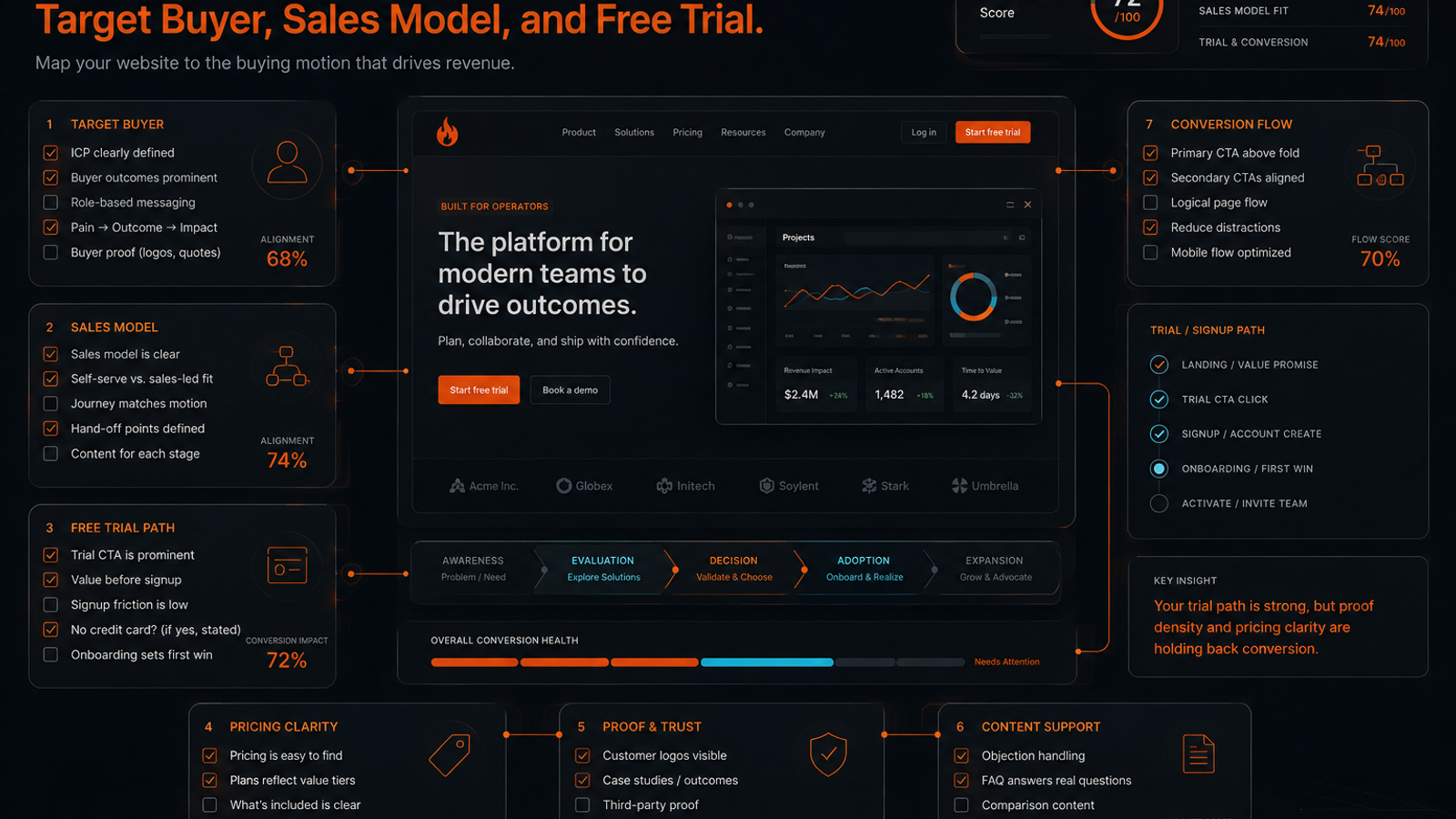
A proper SaaS website analysis starts with strategy, not tactics. Before auditing CTA colors or hero copy, verify the fundamentals. First, is the target buyer clearly defined? Second, does the website's structure and primary call-to-action align with the company's sales model (self-serve, sales-led, enterprise)? Third, is the commitment path—the free trial, freemium signup, or demo request—clear and low-friction? Only after confirming this strategic alignment should an audit proceed to tactical elements like product clarity, proof density, pricing communication, content support, and overall conversion path integrity. Auditing decoration...
Most SaaS website audits start too late.
They begin with the hero section, the CTA color, the pricing page, or whatever screen annoyed the founder last week.
That misses the real issue.
A SaaS website only makes sense when you know three things first: who the target buyer is, what sales model the company is running, and what commitment the visitor is being asked to make. A self-serve free trial page, a product-led freemium site, and an enterprise demo funnel should not be judged by the same checklist.
For the full audit rubric, see SavageAudit's website audit categories. For a single demo page, use the SaaS demo page audit checklist. This is the checklist for the whole site: target buyer, sales model, trial flow, product clarity, proof, pricing, content, and conversion path integrity.
What a SaaS website analysis checklist should test
A good SaaS website analysis does not ask, "Does this page look professional?"
It asks whether the site supports the buying motion.
At minimum, the audit should test:
- target buyer clarity
- sales model fit
- product understanding
- free trial, demo, or freemium flow
- proof density
- pricing and commitment clarity
- content support around buyer questions
- conversion path integrity
- technical and mobile quality
- measurement readiness
That order matters.
If the target buyer is unclear, the copy will sound broad. If the sales model is unclear, the CTA will feel wrong. If the trial path is vague, qualified visitors will hesitate before they ever reach the product.
You are not auditing decoration. You are auditing whether the website can turn intent into the next believable step.
1. Start with the target buyer
Before you judge a SaaS website, name the buyer the page is trying to move.
Not the market. Not "teams." Not "modern companies."
The buyer.
Check:
- Is the primary target buyer obvious above the fold?
- Does the page name a role, team, company type, or operating problem?
- Does the copy speak to the person who feels the pain and the person who approves the purchase?
- Are there signs the site is trying to talk to too many buyers at once?
- Would a cold visitor understand whether the product is for their company size and maturity?
Weak SaaS pages hide behind flexible language.
They say things like:
- built for every team
- scale your workflow
- unlock productivity
- transform operations
That kind of copy protects the company from choosing a buyer. It also makes the page harder to believe.
Strong SaaS pages make a sharper bet.
They sound more like:
- for seed-stage founders auditing launch pages before paid traffic
- for product marketers comparing demo-page conversion leaks
- for agencies running first-pass website audits before client strategy calls
- for growth teams checking whether trial traffic understands the product fast enough
Specificity does not shrink the market when it matches real intent. It lowers interpretation cost.
2. Match the website to the sales model
A SaaS website should make the sales model feel obvious.
The visitor should understand whether they are supposed to:
- start using the product now
- create a free account
- start a trial
- book a sales call
- request pricing
- talk to an implementation team
Each motion needs a different page structure.
| SaaS motion | Primary website job | Common leak | Strong signal |
|---|---|---|---|
| Self-serve | Get the visitor to try the product quickly | Too much sales copy before product access | Clear product value, fast signup, low-risk CTA |
| Free trial | Explain value and reduce setup anxiety | Trial CTA appears before the visitor understands first value | Trial promise, setup expectation, activation path |
| Freemium | Separate casual signup from serious evaluation | Free plan hides the path to paid use | Clear free limits, upgrade trigger, use-case fit |
| Sales-led demo | Earn enough trust for a calendar commitment | Demo ask feels too heavy too early | Strong proof, qualification cues, clear next step |
| Enterprise | Reduce procurement and risk anxiety | Page sounds like startup self-serve copy | Security, process, integrations, proof, buying committee support |
Check:
- Does the homepage CTA match the actual sales model?
- Is the same CTA repeated consistently across product and pricing pages?
- Does the site explain what happens after the click?
- Is there a secondary path for visitors who are interested but not ready?
- Does the website mix "start free" and "book a demo" without explaining the difference?
The most common SaaS conversion leak is not a weak button.
It is a mismatched ask.
A visitor who wants to test the product gets forced into a call. A visitor who needs procurement confidence gets pushed into a free trial. A founder looking for quick validation lands on a page built for enterprise committees.
The page can look polished and still be selling through the wrong motion.
3. Audit the free trial, freemium, or demo path
The CTA is not the end of the audit. It is where the next audit begins.
For a free trial or freemium motion, check:
- Is the trial length visible?
- Does the page explain whether a credit card is required?
- Does the product promise a clear first value moment?
- Are setup time and required inputs clear?
- Does the signup flow avoid unnecessary qualification fields?
- Does the page show what the user can do after signup?
For a demo motion, check:
- Does the page say who the demo is for?
- Does it explain what the visitor will see or learn?
- Does it reduce uncertainty around pricing, implementation, or fit?
- Does the form ask only what the sales process truly needs?
- Does the confirmation state set a clear expectation?
For a hybrid motion, check whether the split is clear.
Bad hybrid:
- "Start free" in the hero
- "Book a demo" in the nav
- "Contact sales" in pricing
- no explanation of when to choose which
Good hybrid:
- "Start free" for individuals and small teams
- "Book a demo" for teams that need onboarding, security review, or multi-seat rollout
- pricing page explains the boundary
- product page reinforces the same logic
This is where product and content audits collide. The product must deliver on the website’s promise, and the website has to make that promise understandable before the visitor commits.
4. Check product understanding before proof
Many SaaS websites rush to proof before the visitor understands the product.
Logos, testimonials, and metrics have their place. But they don't fix a vague product story.
Check:
- Can a visitor explain what the product does after the first screen?
- Does the page show the product interface, workflow, or output?
- Are feature sections tied to real use cases?
- Does the copy explain the mechanism behind the outcome?
- Are screenshots annotated or just decorative?
Weak product explanation:
- "AI-powered insights for modern growth teams."
Stronger product explanation:
- "Submit a SaaS landing page, get a six-category audit across SEO, copy, UX, design, performance, and conversion, then turn the findings into prioritized fixes."
The second version is not prettier. It is more useful.
A SaaS website analysis should flag every section where the copy asks the visitor to believe an outcome without showing the mechanism that creates it.
5. Audit proof by buyer risk
Proof should match the risk the buyer feels.
A founder buying a low-cost self-serve tool needs fast evidence that the product works. A growth lead evaluating a team tool needs proof that the tool fits the workflow. An enterprise buyer needs confidence around security, implementation, reliability, and internal adoption.
Check:
- Are testimonials specific or generic?
- Do customer logos match the target buyer?
- Are metrics attached to a credible context?
- Does proof appear near decision points, not only at the bottom?
- Are security, integration, or workflow concerns answered when the sales model requires them?
Generic proof:
- trusted by teams worldwide
- loved by marketers
- built for scale
Useful proof:
- before-and-after examples
- screenshots of real output
- named customer quotes
- workflow-specific case studies
- integration and security details where relevant
- public examples or sample reports
For SavageAudit, this is also why an internet and social presence audit matters. Buyers do not only judge the page. They judge whether the public footprint supports the claims on the page.
6. Check pricing and commitment clarity
Pricing does not always need to be public. Commitment does.
If a SaaS company hides pricing, the site still has to explain enough for the visitor to know whether the next step is worth taking.
Check:
- Is there a pricing page, plan explanation, or buying path?
- Does the page clarify free, trial, paid, and enterprise boundaries?
- Does it explain what is included in the trial or free plan?
- Are plan names understandable?
- Are usage limits, seats, credits, or core constraints explained?
- If pricing is gated, does the page explain why a conversation is needed?
The problem is not always "no pricing."
The problem is ambiguity.
Visitors hesitate when they cannot tell whether the product is $19 a month, $499 a month, or a six-month procurement cycle. If the site cannot publish exact pricing, it should still publish fit signals: company stage, plan type, minimum use case, rollout model, or what the sales conversation covers.
If a visitor can't guess the commitment, they won't click. Ambiguity kills conversion.
7. Run a SaaS content audit
A SaaS content audit should not count blog posts and call it strategy.
It must determine whether the content supports the buyer questions that block conversion. A strong site answers these questions. Look for content that covers:
- Awareness and Education: Problem awareness, product category education.
- Evaluation: Competitor and alternative comparisons, use-case pages, role-specific content.
- Decision and Purchase: Pricing and ROI concerns, implementation questions, security or compliance details.
- Activation: Help docs or onboarding guides for trial users.
Then map that content back to the sales model.
Self-serve SaaS needs content that helps users decide and activate without talking to a human.
Sales-led SaaS needs content that helps the buyer prepare for the call and justify the conversation internally.
Enterprise SaaS needs content that reduces risk for the buying committee.
If the content library is busy but does not support those jobs, the issue is not volume. It is coverage.
8. Score the conversion path by motion
Do not score every SaaS website against one generic funnel.
Score the path against the motion it actually uses.
| Area | Self-serve or free trial | Sales-led demo | Enterprise |
|---|---|---|---|
| Hero | Product and outcome are instantly clear | Problem, fit, and value are clear | Category, risk reduction, and credibility are clear |
| CTA | Fast signup or trial start | Demo ask is earned | Contact path supports buying committee needs |
| Proof | Product output and user value show early | Customer proof supports the business case | Security, scale, reliability, and process are visible |
| Pricing | Plan and trial expectations are clear | Pricing ambiguity is reduced | Commercial path and procurement support are credible |
| Content | Helps users activate and evaluate alone | Helps buyers prepare for the call | Helps multiple stakeholders de-risk the purchase |
| Form | Low friction | Qualified but not bloated | Captures enough context for a serious sales process |
Use this table to stop vague debates.
If the motion is self-serve, do not overvalue enterprise trust sections while ignoring signup friction.
If the motion is enterprise, do not praise a beautiful trial CTA if the buyer still cannot find security, implementation, or procurement support.
9. Check technical and mobile basics
A SaaS website can have strong positioning and still leak demand through basic execution problems.
This is the unglamorous part of the audit, and often the highest-leverage cleanup.
Check:
- unique title tags and meta descriptions on core pages
- clean H1 and heading structure
- crawlable product, pricing, comparison, and blog pages
- correct canonical tags
- XML sitemap and sensible
robots.txt - fast enough first-load experience
- no broken primary links or forms
- clean mobile layout for hero, pricing, forms, and comparison tables
- Open Graph previews for social sharing
- analytics on CTA clicks, signup starts, demo submissions, and trial activations
If trial traffic is expensive, a broken form, slow page, or awkward mobile pricing table is not a minor issue. It is a revenue leak.
10. Turn the analysis into fixes
The point of a SaaS website analysis is not to produce a long document.
It is to decide what to fix first.
Use this scoring grid:
| Audit area | Red means | Yellow means | Green means |
|---|---|---|---|
| Target buyer | Visitor cannot tell who the product is for | Buyer is implied but not sharp | Buyer and use case are obvious |
| Sales model | CTA motion is confusing | Motion is visible but inconsistent | Website clearly supports the sales path |
| Trial or demo path | Next step feels risky or unclear | Basic path exists with friction | Visitor knows what happens next |
| Product clarity | Outcome claims are vague | Product is understandable after effort | Product and mechanism are clear fast |
| Proof | Proof is generic or late | Some proof supports the claim | Proof matches buyer risk and appears near decisions |
| Pricing | Commitment is ambiguous | Pricing or fit is partially clear | Visitor understands plan, trial, or sales boundary |
| Content support | Buyer questions are missing | Content exists but is patchy | Content supports evaluation and conversion |
| Technical quality | Crawl, speed, mobile, or forms are weak | Mostly working with cleanup needed | Experience is stable and measurable |
Then prioritize in this order:
- Clarify the buyer and sales model
- Fix the primary CTA and next-step expectation
- Make the product mechanism visible
- Move proof closer to decision points
- Repair pricing or commitment ambiguity
- Fill the content gaps that block evaluation
- Clean technical, mobile, and measurement leaks
That order keeps the audit honest.
There is no point rewriting ten blog posts if the homepage still talks to the wrong buyer. There is no point polishing screenshots if the trial path does not explain what happens after signup. There is no point driving more organic traffic into a page that asks for the wrong commitment.
For a faster pass, run a SavageAudit website roast to find gaps across copy, UX, SEO, and conversion. To judge two sites by this same framework, use compare websites.
Common questions
What should a SaaS website analysis include?
A SaaS website analysis should include target buyer clarity, sales model fit, product understanding, free trial or demo flow, proof, pricing clarity, content support, conversion path quality, technical basics, mobile usability, and measurement readiness.
How is a SaaS website audit different from a landing page audit?
A landing page audit usually focuses on one page and one conversion goal. A SaaS website audit looks at the full system around the sale: homepage, product pages, pricing, trial or demo path, content support, proof, and technical quality.
How do you audit a SaaS free trial page?
Audit whether the trial promise is clear, whether a credit card is required, how long the trial lasts, what setup is needed, what the first value moment looks like, and whether the signup flow avoids unnecessary friction.
What is the biggest mistake in SaaS website analysis?
The biggest mistake is judging the page before defining the sales model. A self-serve product, free-trial product, sales-led demo funnel, and enterprise SaaS site need different CTAs, proof, pricing clarity, and content support.
How often should a SaaS company audit its website?
Audit the website before a launch, after a pricing or positioning change, before paid traffic campaigns, before a redesign, and whenever trial starts, demo requests, or organic conversion quality drops without an obvious product reason.
Keep the diagnosis moving
Run your own public presence audit
See how your website, search footprint, AI visibility, social proof, and conversion trust look from the outside.