
UTM parameters are labels added to a destination URL to describe the source, medium and campaign behind an incoming visit. Use a consistent naming convention, preserve the parameters through redirects, and inspect session manual source, medium and campaign name in GA4. Building a link and verifying collection are separate steps. The builder screenshot is real; the sample campaign and expected reporting values are illustrative.
You share an article in your newsletter, post it on LinkedIn, and send it to a partner. A week later, you open Analytics. The article has visitors. Which promotion brought them?
Add campaign labels before you share those links. Then check whether GA4 received the labels you chose. Creating the URL is straightforward. Finding the right fields in the report takes another check.
UTM parameters are labels in a URL that describe where a visit came from and which promotion sent it. For a newsletter link, the source could be the newsletter name, the medium could be email, and the campaign could identify the particular promotion.
The example below follows a fictional newsletter campaign linking to a real SavageAudit article. We entered the values in Google's Campaign URL Builder on November 22, 2026. The screenshot records that step. The campaign names and expected report values are examples; we did not send a newsletter or measure campaign results for this guide.
UTM source vs medium vs campaign
Start with three questions. Who is sending the visitor? Through which channel? For which promotion?
| Parameter | What you put here | Example for our newsletter link |
|---|---|---|
| `utm_source` | Sending publication, platform or partner | `founder_notes` |
| `utm_medium` | Marketing channel | `email` |
| `utm_campaign` | Promotion name shared across its placements | `november_audit_guide` |
| `utm_content` | Placement or creative you want to distinguish | `hero_cta` |
The source and medium describe different things. founder_notes tells you which newsletter. email lets you compare that newsletter with other email activity. Using newsletter as the source for every publication would remove a distinction you may need later.
Keep the campaign name stable when you promote the same initiative through several channels. You can then compare each source and medium within that campaign. Use different content values for two links inside the same email, such as hero_cta and text_link.
Google also supports parameters such as utm_id for a campaign identifier and utm_term for paid keyword information. A small email campaign can begin with the fields above. Agree on additional fields with whoever maintains your advertising and analytics setup.
Build one tagged link
Our destination is the existing call to action examples article. The fictional newsletter promotes it as part of a November audit guide campaign.
Destination: https://savageaudit.com/blog/call-to-action-examples
Source: founder_notes
Medium: email
Campaign: november_audit_guide
Content: hero_cta
In Google's Campaign URL Builder, select the Web tab and enter the destination in website URL. Fill in campaign source, campaign medium and campaign name. Add campaign content for the placement you want to compare.
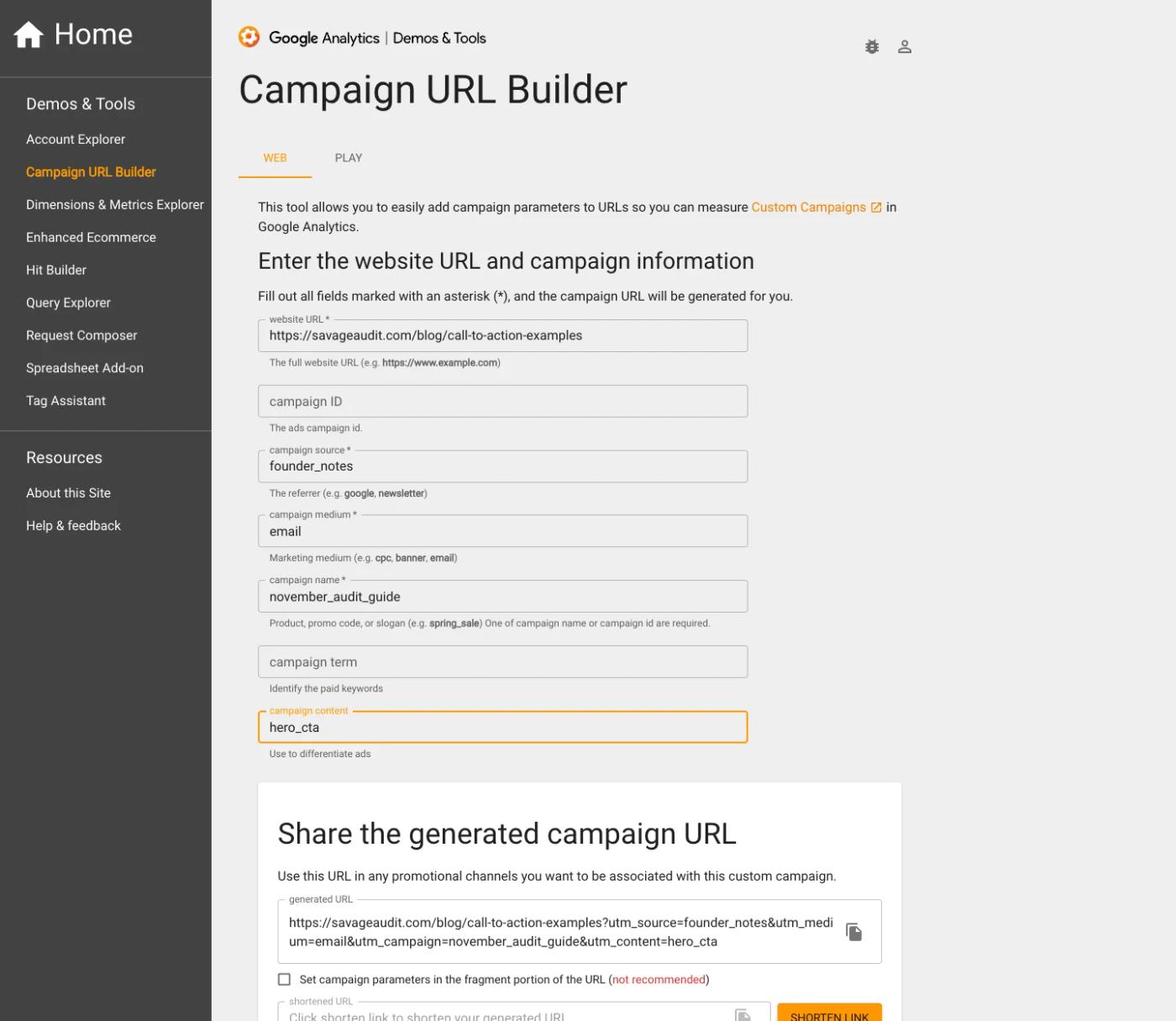
The resulting link contains those values as query parameters:
https://savageaudit.com/blog/call-to-action-examples?utm_source=founder_notes&utm_medium=email&utm_campaign=november_audit_guide&utm_content=hero_ctaKeep the URL on one line when you paste it into an email editor. The ? starts the query string and each & separates another parameter. The order of these four parameters does not change their labels.
Check the destination before adding tracking. A correct set of UTMs on the wrong article still sends readers to the wrong article.
Build the URL without editing separators by hand
If your destination already has a query string, another question mark can break your intended parameters. JavaScript's URL API handles the separators and value encoding:
const destination = new URL(
  'https://savageaudit.com/blog/call-to-action-examples'
)

const campaign = {
  utm_source: 'founder_notes',
  utm_medium: 'email',
  utm_campaign: 'november_audit_guide',
  utm_content: 'hero_cta',
}

for (const [name, value] of Object.entries(campaign)) {
  destination.searchParams.set(name, value)
}

console.log(destination.toString())
This code only builds the link. Check the destination and analytics collection before sharing it.
Keep the names useful when more people start sharing links
Before your next campaign, write down the approved source, medium and campaign values. For a small team, a short shared reference can prevent two people naming the same promotion differently.
For this example, a naming decision might look like this:
| Field | Agreed value | Reason |
|---|---|---|
| Source | `founder_notes` | Names this particular newsletter |
| Medium | `email` | Groups the delivery method consistently |
| Campaign | `november_audit_guide` | Keeps the promotion recognizable |
| Content | `hero_cta` or `text_link` | Distinguishes placements within the message |
Use lowercase values and one separator convention. Keep the exact spelling when another person creates a link. GA4 treats differently capitalized UTM values as different values, so Founder_Notes and founder_notes can split your reporting.
Avoid naming a campaign after a result you have not measured. best_converting_email gives the reader of your report a conclusion without evidence. A recognizable promotion name makes the report easier to interpret.
Never put an email address, phone number, customer name or access token in campaign values. A recipient can copy or forward the URL. Keep labels about the campaign rather than the individual opening it. Our audit tool privacy checklist also covers checking a URL before sharing it with an audit service.
Check the link before you distribute it
Use the final link from the actual email or publishing tool. An editor preview alone may skip a redirect or tracking wrapper that recipients encounter.
Open it in a browser and check the final destination. Did you reach the intended page? Did the campaign parameters survive any redirects? If the site removes parameters after loading, check when that happens relative to analytics collection. A clean address bar alone does not prove collection failed.
For a controlled analytics check, use a test property or an agreed testing procedure. Record the test time, property and stream. Use a fresh testing session when checking session acquisition labels. A tagged click during an existing GA4 session does not replace that session's source. Follow the site's consent flow, then inspect the collected destination and campaign information with your analytics debugging tools.
Do not bypass a visitor's consent choice to make a test pass. Record the conditions under which collection works. A browser with blocking enabled can produce a different result from your normal browser.
The screenshot confirms the builder step. On your site, complete the collection check before relying on a campaign report.
Find the campaign in GA4
For a manually tagged campaign, use GA4's Manual report and its session manual dimensions. In Google's documented navigation, open Reports, then Acquisition > Overview, and select View Manual campaigns from the sessions-by-manual-source card. Your property's report collection may differ; an editor can add the report if it is absent.
Set the date range to include the visit in the property's reporting timezone. Then inspect Session manual campaign name and compare the source and medium. For our illustrative link, these are the values you would check for after collection and processing:
| GA4 dimension | Expected label from the example link |
|---|---|
| Session manual source | `founder_notes` |
| Session manual medium | `email` |
| Session manual campaign name | `november_audit_guide` |
| Session manual ad content | `hero_cta` |
This table shows field mapping, not a screenshot of measured traffic. Use it to check the labels before interpreting campaign totals.
Use session dimensions when your question concerns the campaign associated with a session. First-user dimensions answer a different acquisition question. Check the dimension name before comparing figures from two reports.
If you use the GA4 Data API, the corresponding session fields include sessionManualSource, sessionManualMedium, sessionManualCampaignName and sessionManualAdContent. Use them with a metric such as sessions and a defined date range. Keep the property ID and timezone beside the result in your own notes.
The landing-page query-string trap
Google documents that GA4 omits UTM parameters from Landing page + query string and Page path + query string. Their absence from those dimensions is expected. The URL information appears in Page location, while the manual campaign dimensions hold the campaign labels.
So check the appropriate campaign fields before deciding that GA4 lost your tags. Searching a landing-page table for utm_campaign= can send you looking for a defect that the table cannot establish.
Your campaign shows (not set). Check the missing field first
Treat (not set) as a reason to inspect a particular field. It does not identify the cause on its own, and some traffic has no manually supplied campaign name.
| What you see | What to check next |
|---|---|
| Source is present; medium or campaign is `(not set)` | Compare the distributed URL with the agreed fields. Check for missing parameters and collection overrides. |
| None of the expected labels appears | Confirm the property, date range and report dimensions, then inspect the final destination and collection. |
| Two almost identical campaign rows | Compare capitalization, punctuation and spelling across the actual links. |
| A redirect reaches the right page but loses the query string | Inspect the redirect rule and preserve the intended campaign parameters. |
| Debugging shows collection but a standard report has no row yet | Allow for processing and inspect relevant reporting filters before rebuilding the link. |
For example, this partial link supplies a source but leaves the medium and campaign undefined:
https://savageaudit.com/blog/call-to-action-examples?utm_source=founder_notesIf your report shows that source with missing manual fields, inspect the original link before blaming the report. Then check whether your site or tagging configuration changed the incoming values.
Google notes that processing can take 24–48 hours and report data can change during that period. Use debugging to inspect collection without expecting every standard report to update at once.
Do not label all direct visits or all missing campaign fields as broken tracking. Start with a specific link whose values you know, trace its collection, and compare the corresponding fields. That gives you a defect you can reproduce or a reporting behavior you can explain.
Keep UTMs off ordinary internal navigation
Use campaign tags for incoming promotions. For a link from your own homepage to your pricing page, measure the internal click with an event or another suitable navigation measurement.
An internal label such as utm_source=homepage mixes a page location with acquisition information. It can affect campaign information associated with collected events and make the visitor's journey harder to interpret.
Encountering a new campaign value does not start a new GA4 session. Google explains that values collected during an existing session can apply to those events without replacing that session's campaign source. Avoid using the old claim that every internal UTM starts a new session.
Our internal linking audit covers the navigation and discoverability side. For this measurement task, keep the acquisition labels and on-site interaction events distinct.
UTM tracking and Google Ads auto-tagging
Check your integration before replacing an advertising platform's tagging setup. Google Ads auto-tagging can supply platform-specific campaign information through its integration with GA4.
Manual and auto-tagged fields have precedence rules. A manually entered campaign label may not behave like the cross-channel campaign dimension you expected when both methods are present. Inspect the relevant manual and advertising dimensions before changing your ads.
The newsletter example in this article has no ad-platform integration. Apply it to that kind of manually tagged incoming link. For Google Ads, review account linking, auto-tagging and your measurement requirements together.
A campaign visit is the start of the measurement
Once you can find the campaign, decide what counts as useful traffic. For an article, that might include a meaningful next-page visit or a relevant signup. For a product page, it might be a completed trial activation or a qualified inquiry, provided your setup records that outcome.
Keep the units clear. A person can have several sessions, and a contact-button click still needs to lead to a completed inquiry or sale. UTMs help label where the activity came from; the event definitions and implementation determine what your outcome figures mean.
If you compare the hero_cta and text_link placements, record their distribution and context too. A higher session count does not establish that one placement performs better when more readers saw it or the audiences differed. Treat that comparison as an observation until you have a suitable experiment or comparable exposure.
You can use SavageAudit to review the destination page alongside this work. Check campaign collection in GA4 and your tagging setup. Then use the website review to inspect what visitors encounter after arriving. A campaign report and a page audit answer related parts of the growth question.
Before sharing the next link, agree on the labels, test the final destination, and write down the report fields you will inspect. After the campaign, compare the recorded visits with the outcome you intended readers to complete.
Common questions
What are UTM parameters?
UTM parameters are campaign labels added to a destination URL. They describe the incoming source, medium and promotion so an analytics setup can report that information. They do not install analytics or guarantee that every click produces a recorded session.
What is the difference between UTM source and medium?
Source names the sending publication, platform or partner, such as founder_notes. Medium names the marketing channel, such as email. Keep those roles consistent across your links so you can compare sources within a channel.
Where can I see UTM parameters in GA4?
For manually tagged campaigns, inspect the Manual report using session manual source, medium and campaign name. Check the property's date range and timezone. GA4 omits UTMs from Landing page + query string and Page path + query string; use the relevant campaign fields and Page location when investigating collection.
Why is my UTM campaign showing not set?
A missing parameter is one possible cause. Check the actual distributed URL, redirect behavior, analytics collection and chosen report dimension. A missing value does not prove that all tracking failed, and traffic without manual campaign tagging may have no manual campaign name.
Should I add UTM parameters to internal links?
Keep ordinary internal navigation free of campaign tags and measure the interaction with an appropriate event. New campaign values do not start a new GA4 session, but they can affect campaign information associated with events collected during that session.
Do UTM parameters improve SEO rankings?
UTMs label campaigns for measurement; adding them is not an SEO ranking tactic. Keep normal internal links focused on the intended page. If multiple URL variants raise an indexing question, inspect canonical handling as a separate technical SEO task.
Run your own public presence audit
See how your website, search footprint, AI visibility, social proof, and conversion trust look from the outside.