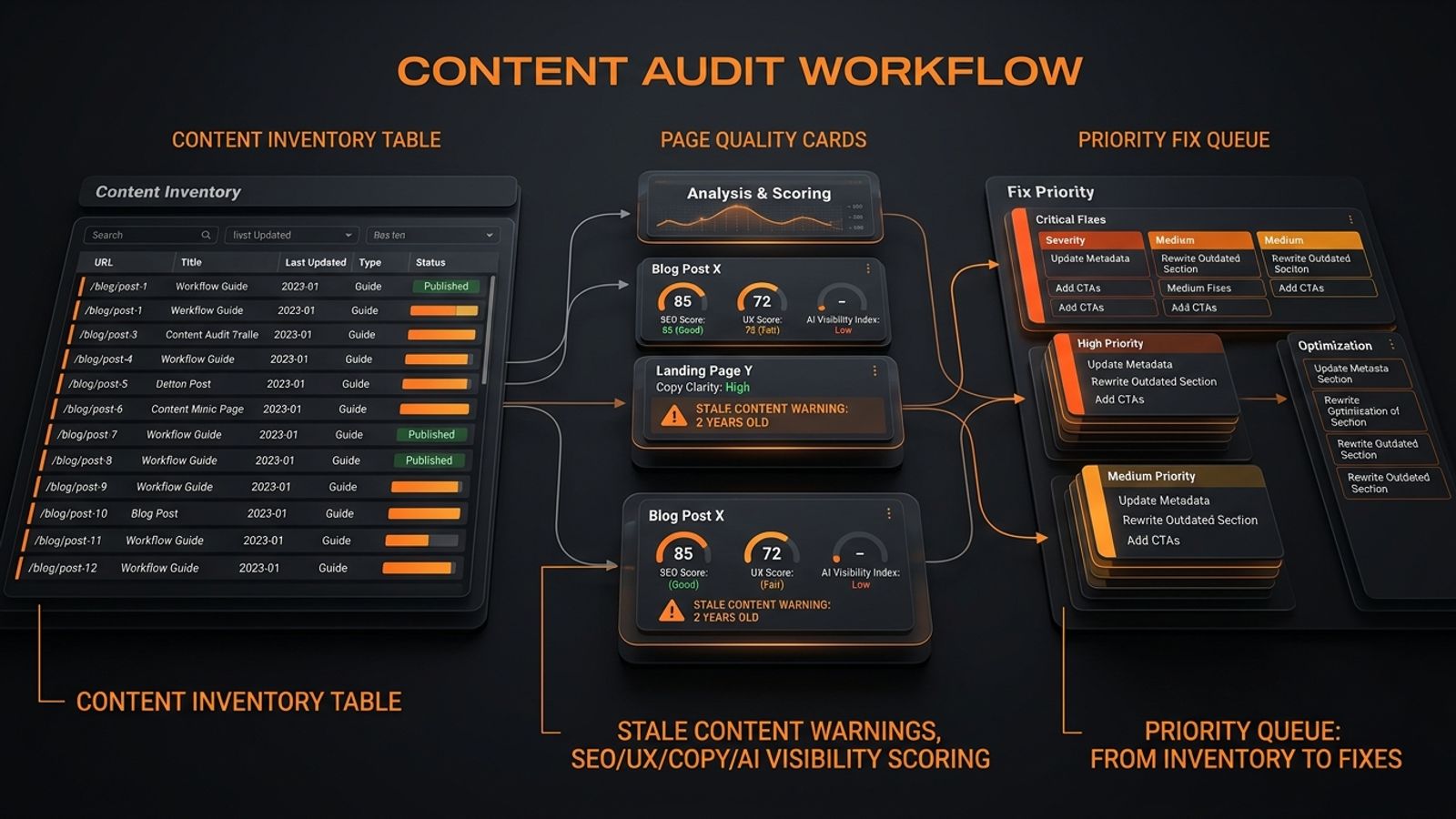
A content audit workflow for content teams is a repeatable process that turns a raw content inventory into an actionable fix queue. It involves five key steps: 1. **Inventory**: Create a list of key business URLs. 2. **Triage**: Tag and group pages by role, status, and problem type to find patterns. 3. **Diagnose**: Go beyond data to find the 'why' behind underperformance across SEO, copy, UX, and conversion. 4. **Prioritize**: Use a severity model (Critical, High, Medium) to rank fixes by business impact, not opinion. 5. **Act**: Choose the right action for each page—refresh, merge, rewrite, redirect, or leave alone—and assign it to an
Most content audits fail for one boring reason: teams stop at inventory.
They export a spreadsheet, tag a few URLs, and stare at 400 rows of “publish date, word count, impressions.” That is not a workflow. That is a graveyard with columns.
A real content audit workflow for content teams should do one thing well: turn a messy inventory into a ranked fix queue your team can actually execute. Not “insights.” Not “observations.” A queue. Refresh this. Merge that. Redirect this. Rewrite this. Leave that alone.
SavageAudit fits after inventory as the blunt prioritization layer. It helps teams spot stale pages, vague messaging, weak proof, poor answer extraction, and conversion friction before you waste a sprint on the wrong pages. This is not another best-tool roundup. It is the part of the process that says, “Here is what is broken, how bad it is, and what to fix first.” Our audits cover Performance, SEO, Design, Copy, UX, and Conversion, with live internet context layered in for sharper critique.
---
The Workflow in One Sentence
Inventory the content, tag and group it, score it against business impact, then use a severity-based audit to decide whether each URL should be refreshed, merged, rewritten, redirected, compared, or left alone.
That is the workflow. Everything else is detail.
---
1. Build the Inventory First
Start with a complete list of URLs that matter to the business:
- Core landing pages
- Product and pricing pages
- Blog posts that drive search traffic
- Comparison pages
- Help and docs pages
- Case studies and proof pages
- Any page tied to signups, demos, or revenue
Do not try to audit a 10,000-page site all at once. Scope the work to the content that affects acquisition, conversion, and trust. The point of inventory is not to admire volume. It is to establish the working set.
Your inventory needs columns that drive decisions, not just count words. At minimum, capture:
- URL
- Page type (e.g., landing page, blog post, docs)
- Topic or primary keyword
- Funnel stage
- Traffic and conversions
- Last updated date
- Owner
SavageAudit’s approach to a full-site audit is built around a representative crawl of these key pages. It looks for recurring issues across the site because single-page audits miss template rot.
---
2. Triage the Inventory to Make It Usable
A content inventory without tags is just a list. Tagging turns it into a tool for making decisions.
Lazy tags like “blog” or “SEO” are useless. They do not tell you what to do. You need tags that map to actions. Is this a money page? Is it stale? Does it suffer from weak proof or conversion friction? Is it cannibalizing another page? Those are useful tags.
Group your tags into categories that help you filter and sort:
- Page role: Money page, Support page, Proof page, Education page.
- Content status: Fresh, Stale, Thin, Overlapping, Outdated, Underperforming.
- Action type: Keep, Refresh, Rewrite, Merge, Redirect, Prune.
- Problem type: Weak intent match, Vague messaging, Weak proof, Poor answer extraction, Conversion friction.
Do not audit pages as isolated objects. Group them by pattern to find systemic rot:
- Pages with the same template
- Pages that target the same intent
- Pages competing for the same query
- Pages at the same funnel stage
If three posts all target the same topic, you probably have a consolidation opportunity. If five landing pages all fail the same CTA pattern, the problem is the template, not the page. This is why a full-site audit that rolls up recurring issues into a single verdict is more valuable than patching one page at a time.
---
3. Diagnose the Why Before You Touch the Copy
Data tells you what is happening. It does not tell you why.
A page might underperform because the headline is vague, the proof is weak, the page is slow, or the structure makes extraction painful for search engines. You need a blunt diagnosis across six dimensions:
- Performance: Is the page slow enough to kill engagement?
- SEO: Are the meta tags, heading hierarchy, or crawl signals broken?
- Design: Does the visual hierarchy support the message?
- Copy: Does the page say what it does, for whom, and why it matters?
- UX: Can users scan and act without friction?
- Conversion: Are trust signals, CTAs, and proof doing their job?
SavageAudit is built for this diagnosis. It produces a data-backed verdict across all six areas, augmented with live internet context. It surfaces exact problems, not generic praise. Content teams do not need nicer language. They need fewer blind spots.
This looks like:
- A blog post ranks but does not convert: maybe the answer is extractable, but the CTA is buried.
- A demo page gets traffic but leaks leads: maybe the hero is vague and the proof is thin.
- A help article gets clicks but fails AI extraction: maybe the headings do not form a stand-alone outline.
If the page cannot answer a query clearly, it is weak for both users and answer engines. For citation-ready content, pages must be fresh in both intent and evidence. A new publish date on stale information is useless.
---
4. Prioritize With Severity, Not Opinions
This is where most audits become theater. Everyone has an opinion. Few teams have a priority model. Use severity to sort issues by impact.
Critical
Fix this now. The page blocks revenue, indexing, or basic trust.
- Pricing or demo page with a broken CTA.
- Key landing page with misleading hero copy.
- A page with major trust gaps right next to the buy button.
High
Fix this sprint. The issue hurts discovery, trust, or core decision-making.
- Weak proof on a page that supports a purchase decision.
- Missing answer extraction on a key educational page.
- Template-level metadata issues affecting a whole section.
Medium
Fix next sprint. The problem creates friction but does not fully break the page.
- Unclear section order.
- Outdated screenshots.
- Weak internal linking.
Low-to-Medium
Fix when you can. The page is functional but vague or underpowered.
- Better headlines.
- Stronger CTA language.
- Clearer copy around audience or differentiation.
Backlog
Leave it. This is polish, not leverage.
- Minor copy tweaks.
- Decorative design changes.
The rule is simple: if the issue affects revenue, trust, crawlability, or conversion, it jumps the queue. Our website audit severity levels are built the same way. It is how teams stop confusing work with progress.
---
5. Choose the Right Action for Each Page
Now convert diagnosis into action.
Refresh
Refresh a page when its core idea is sound but the details are stale. This is the right move when stats are old, product details have changed, examples are dated, or the proof is weak. A content freshness audit means updating definitions, examples, and evidence to keep the page credible and answer-ready.
Merge
Merge pages that try to do one page's job. If two or more pages compete for the same keyword or cover the same ground, you are creating confusion for users and search engines. Pick the strongest URL as the primary, fold in the best content from the others, and redirect the retired pages.
Rewrite
Rewrite a page when the structure is fine but the message is broken. The headline does not explain the offer, the copy is too generic, or it answers the wrong question. It is a deeper fix than a refresh because the core argument is flawed.
Redirect
Redirect pages that no longer have a purpose. If the content is obsolete, duplicates a better resource, or has been superseded by a newer page, redirect it. Do not leave dead ends.
Compare
Use a side-by-side comparison as a diagnostic tool for redesigns or competitive analysis. Run an audit on a page and its direct competitor, or on the old version and the new one, to see a verdict on what works and what does not.
Leave Alone
The most underrated action. If a page is current, clear, extractable, and performing its job, do not “improve” it just to feel productive. Move on to a page that is actually broken.
---
6. Operationalize the Workflow or It Dies in a Spreadsheet
An audit is not useful until it becomes a fix queue. Your output for each task should be a minimum viable ticket:
- URL
- Problem
- Severity
- Action
- Owner
- Deadline
Sort the queue by severity first, then by effort. A practical order is:
- Critical revenue blockers
- High trust or indexing blockers
- Template-level fixes that affect multiple pages
- Medium-friction content cleanup
- Backlog polish
Put the work into whatever project management tool your team actually uses. If the content lead, SEO manager, and product marketer cannot tell who owns the next move, the audit is not real.
A page audit is for an isolated failure; a website audit is for systemic rot. Choose the right tool for the job.
---
Who Should Run This Workflow?
A useful content audit team is small and cross-functional:
- Content lead: owns scope, tagging, and final decisions.
- SEO lead: handles crawl data, query overlap, and index issues.
- Writer or editor: evaluates clarity, freshness, and extractability.
- Product marketing or founder input: validates positioning and proof.
You do not need a committee. You need people who can make calls.
---
Bottom Line
A content audit is not a report. It is a decision system.
Inventory the URLs. Tag the mess. Group the patterns. Score the impact. Use severity to choose the order. Then turn the whole thing into a fix queue.
If your audit cannot tell you what to refresh, merge, rewrite, redirect, compare, or ignore, it is not done.
Common questions
What is a content audit workflow for content teams?
It is the repeatable process of inventorying content, tagging and grouping pages, scoring them by business impact, and turning findings into a ranked fix queue.
What should come after content inventory?
Tagging, grouping, scoring, and severity-based prioritization. Inventory alone does not create action.
Should we use page audits or full-site audits?
Use page audits for isolated failures. Use full-site audits when problems recur across templates or multiple pages. SavageAudit offers both page-level and full-site diagnosis.
What should we refresh first?
Refresh pages that are high-value but stale, under-trusted, or weakly extractable. Fix anything that affects revenue, indexing, or credibility before you spend time on low-impact polish.
How does SavageAudit help content teams?
It delivers a blunt, data-backed audit across Performance, SEO, Design, Copy, UX, and Conversion, helping teams prioritize real leaks instead of guessing.
Keep the diagnosis moving
Run your own public presence audit
See how your website, search footprint, AI visibility, social proof, and conversion trust look from the outside.