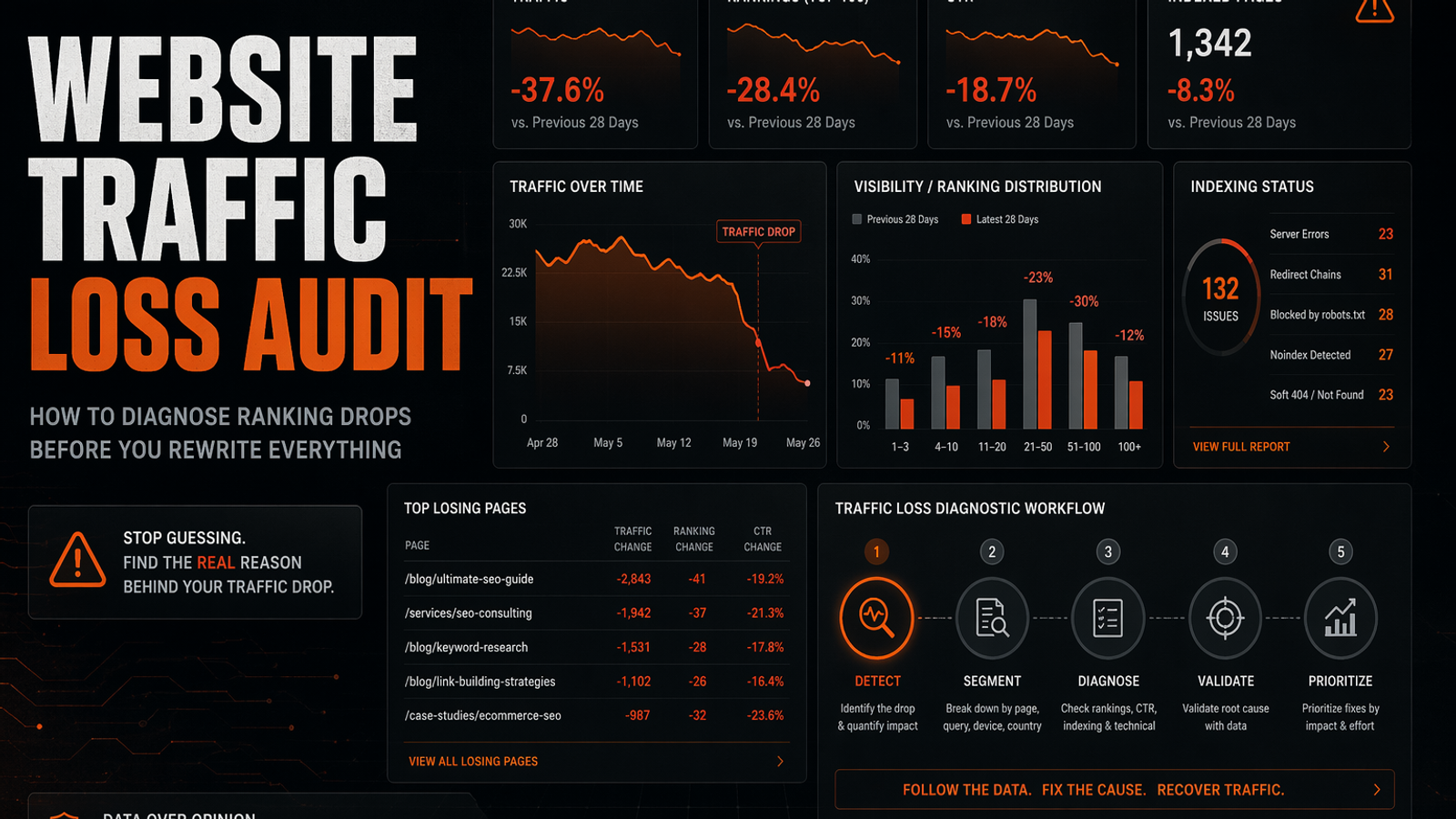
A website traffic loss audit is a structured diagnostic process to find out why organic traffic declined before making any content changes. It separates actual ranking drops from CTR declines, indexing failures, content decay, competitor displacement, and conversion leakage. By analyzing Google Search Console data to isolate page-level losers and comparing lost queries, teams can determine the exact cause of the drop. This prevents unnecessary rewrites and helps you decide whether to refresh, merge, redirect, rewrite, or ignore the affected pages.
When organic traffic suddenly dips, the instinct is to panic. Teams log into their CMS, open the pages bleeding visibility, and start rewriting paragraphs in the name of "content freshness." That isn't a strategy. It's just guessing with a keyboard.
A real website traffic loss audit forces you to step back and separate the culprits. It requires you to figure out whether you are dealing with a ranking loss, a click-through rate (CTR) drop, indexing failures, content decay, competitor displacement, or a broken conversion path. Until you know exactly which mechanism broke, rewriting your content is an expensive waste of time.
This playbook outlines a clear diagnostic workflow to find the actual cause of a traffic drop before you touch a single line of copy.
What Is a Website Traffic Loss Audit?
A website traffic loss audit is a structured diagnostic process for finding why organic traffic declined and determining the correct corrective action. The goal is never simply to find pages to update.
Instead, the audit answers a specific set of questions. You need to know if traffic actually dropped or if your reporting setup just broke. You need to identify whether rankings fell, or if clicks disappeared while your average position remained perfectly stable. A thorough audit pinpoints exactly which URLs and queries lost traction, checks for technical indexing roadblocks, and evaluates whether competitors or SERP layout changes displaced you.
Google’s own troubleshooting guidance starts with checking Search Console for changes in impressions, clicks, and position, then directs site owners to the URL Inspection and indexing reports when pages decline. Age alone is not a diagnosis. Treating an old article as broken simply because traffic dropped is a mistake.
First: Separate Traffic Loss From Ranking Loss
Traffic loss and ranking loss are entirely different problems requiring different solutions.
A page can easily lose traffic while its rankings stay relatively stable. This usually happens when overall search demand drops, or when the SERP becomes crowded with ads, featured snippets, AI overviews, and maps. It also occurs when your title tag stops earning clicks or your brand appears less trustworthy than adjacent results. Conversely, a page can lose rankings but maintain its total traffic if a different query or a surge in branded search compensates for the decline.
The distinction is critical. A genuine ranking drop usually requires stronger content, better internal linking, technical repairs, or a completely different page format. But when rankings are stable and CTR is falling, you need better title alignment, stronger proof, and cleaner positioning.
You can use average position data to figure out exactly which problem you have. Checking position first tells you whether to focus on ranking visibility or click appeal. For a deeper dive into this specific workflow, read our guide on diagnosing impressions but no clicks. Always verify whether visibility actually dropped before you rewrite a page for a click problem.
Step 1: Confirm the Drop Is Real
Before diagnosing anything, rule out reporting artifacts. Verify that you are comparing the exact same date range year over year, using the same country, device, and search type settings. Ensure there are no tracking outages, recent consent banner updates, or hidden CMS migrations skewing the data.
Use both your web analytics platform and Google Search Console to verify the decline. Analytics shows you sessions and user behavior, while Search Console reveals Google Search visibility. When pulling Search Console data, extract queries and pages alongside impressions, clicks, CTR, position, country, and device. This gives you a clear picture of actual search behavior rather than dashboard noise. To see a complete walkthrough of this data extraction, check out how to do a Google Search Console website audit.
Tracking or attribution errors are likely the culprit when your analytics traffic drops but Search Console clicks remain steady. Conversely, when Search Console clicks drop too, the issue is happening on the search engine's side.
Once confirmed, classify the pattern:
| Drop pattern | Likely direction |
|---|---|
| Sudden cliff | Technical issue, indexing issue, migration, manual change, algorithm timing |
| Gradual slide | Content decay, competitor displacement, intent drift, internal link erosion |
| Seasonal dip | Demand fluctuation, not always a problem |
| Page cluster decline | Template, taxonomy, internal link, or intent issue |
| Sitewide decline | Technical, algorithmic, tracking, or demand issue |
Avoid diagnosing your site from the highest-level dashboard. Sitewide charts mask page-level realities.
Step 2: Split Impressions, Clicks, CTR, and Position
Open Google Search Console and compare the drop period against the previous equivalent period. Looking at four metrics in isolation helps you understand the mechanics of the decline.
A drop in impressions typically signals lost visibility. Google is showing your page less often, which means you need to check your rankings, indexation status, overall query demand, and whether the page still matches user intent.
On the other hand, stable impressions paired with falling clicks point to a CTR issue. Your page is still visible, but searchers are choosing other results. This requires inspecting your titles, meta descriptions, brand trust signals, and the presence of new SERP features pushing your link down the page.
When both clicks and impressions drop but your average position stays stable, overall search demand for the topic may have shrunk, or Google might be answering the query directly on the results page. Finally, a drop in average position confirms a true ranking loss, pointing to issues with relevance, authority, internal links, or aggressive competitor displacement.
Step 3: Identify Page-Level Losers
A sitewide traffic drop is too broad to be actionable, so you need to isolate the URL-level losers. Export your Search Console performance data by page and compare the before-and-after metrics.
Example diagnostic table:
| URL | Clicks before | Clicks after | Delta | Impressions delta | CTR delta | Position delta | Suspected cause |
|---|---|---|---|---|---|---|---|
| `/blog/example` | 1,200 | 640 | -560 | -38% | -1.2 pts | +4.6 | Ranking loss |
| `/features/reporting` | 420 | 390 | -30 | +5% | -1.1 pts | Stable | CTR loss |
| `/pricing` | 300 | 180 | -120 | Stable | -2.4 pts | Stable | SERP/title/trust issue |
Sort your export by total lost clicks rather than percentage decline. A page that dropped from 6 clicks to 1 is statistically irrelevant, but a page that lost 2,000 qualified visits demands immediate attention.
Next, tag each losing URL by type—whether it's a feature page, blog post, comparison asset, or pricing page. This classification prevents you from applying blog-post fixes to commercial software pages. A feature page ranking for commercial queries usually needs stronger proof, direct comparisons, and internal links to recover. A blog post might just need better query coverage or consolidation.
Step 4: Compare Lost Queries Before Rewriting
Drill into each losing URL to compare its queries before and after the drop. This step exposes most bad SEO decisions. A page might lose traffic because a single high-value query tanked, because dozens of long-tail variants slowly decayed, or because Google shifted the URL from commercial queries to purely informational ones.
Hypothetical query-loss table:
| Query | Clicks before | Clicks after | Impressions before | Impressions after | Position before | Position after | Intent |
|---|---|---|---|---|---|---|---|
| “crm reporting software” | 90 | 20 | 2,000 | 900 | 4.2 | 9.8 | Commercial |
| “how to build sales report” | 60 | 55 | 1,700 | 1,650 | 6.1 | 6.4 | Informational |
This granular view tells you exactly what to fix. When a commercial query collapses while an informational query holds steady, rewriting the entire page as a generic "how-to" guide will likely destroy whatever value is left. When Google ranks the page for a query it no longer satisfies, you need to restore the missing context or build a dedicated target page for that specific search intent.
Preserve the reason the URL ranked by mapping search demand directly to specific URLs and intent. Exporting query-page pairs with clicks, impressions, CTR, and average position lets you see which demand belongs to which URL before making changes. To learn more about mapping demand to URLs, read how to compare website rankings before a redesign.
Step 5: Check Technical and Indexing Causes
Before blaming the quality of your content, verify that Google can actually access, crawl, render, canonicalize, and index the page.
Check the losing URLs for accidental noindex tags, robots.txt blocks, broken canonicals, or redirect chains. Look for JavaScript rendering problems, removed internal links, sitemap changes, or mobile layout shifts. Run high-value pages through the URL Inspection tool in Search Console, as Google’s own traffic-drop guidance points site owners toward these reports when diagnosing declines.
Compare your total indexed page counts around the time of the drop. Finding that the number of valid indexed pages fell concurrently with your traffic means you are dealing with a technical indexation problem rather than a sudden drop in content quality. Catching a technical issue early saves the content team from spending weeks rewriting pages that Google couldn't even read.
Step 6: Check Content Decay and SERP Displacement
Content decay is a real phenomenon, but marketing teams often use it as a lazy explanation for any traffic drop. A page decays when it used to satisfy search demand but now underperforms because the market, the product, or user expectations have moved on.
You can spot content decay when rankings decline gradually across many related queries, or when competitors start offering newer, more specific answers. Outdated screenshots, retired integrations, and old pricing mentions are immediate red flags. Focus on removing these stale elements and ensuring your facts directly answer current buyer questions. You can learn more about updating stale pages in our content freshness audit for AEO.
However, not every old page needs a refresh. Some pages lose traffic simply because the SERP layout changed. Investigate the live search results for your lost queries. Watch for direct competitors overtaking you, or Google favoring new formats like interactive tools, videos, and comparison tables. Adding 500 words won't solve the problem when the SERP now rewards comparison pages and yours is a generic blog post. You have to match the new winning format, intent, and proof standard.
Step 7: Check Internal Changes and Conversion Leakage
Traffic drops frequently trail right behind minor internal website changes that nobody mentioned to the SEO team. Audit your recent timeline for CMS releases, template changes, navigation updates, internal link cleanups, or URL edits. Even adjusting a meta robots tag or removing an old FAQ section can trigger a steep ranking decline.
For recent site redesigns, compare your old and new rankings by mapping old URL demand to new URL intent. Verify that the new page still satisfies the specific queries that mattered.
Beyond traffic, you must evaluate whether the drop actually hurt the business. Review your organic conversions, demo completions, and pipeline generated by the affected page clusters. A traffic drop can easily mask a conversion problem. A page that lost 20% of its traffic but doubled its qualified conversions is a win, whereas a page that maintained traffic but stopped producing leads requires immediate intervention.
Step 8: Decide the Fix
Once you have diagnosed the root cause, you can prescribe the correct fix. Instead of defaulting to a massive spreadsheet of generic content updates, choose one of these targeted actions based on your findings.
Refresh
Choose a refresh when the page still matches the target intent and has valuable query history, but rankings have declined gradually and competitors are simply more current. Update the accuracy of your claims, add modern proof and examples, fix broken internal links, and improve the clarity of the direct answers.
Merge
Merging is the right call when multiple weak pages on your site are splitting authority around the exact same query or intent. Consolidate carefully by preserving the strongest sections of content, redirecting the weaker URLs to the new primary page, and updating all internal links.
Redirect
Apply a redirect when a page is completely obsolete, but it still holds backlinks or residual traffic and has a highly relevant replacement page. Never redirect unrelated content just to save link equity, as this creates a confusing experience for users and search engines alike.
Rewrite
A total rewrite is necessary when the page targets the wrong search intent, the format is entirely wrong for the current SERP, or the existing content is too poorly structured to be salvaged. Treat a rewrite as a last resort rather than your default reaction.
Ignore
Sometimes the best action is no action. Let it go when the lost traffic was low-value, strictly seasonal, entirely irrelevant to your product, or completely disconnected from your business goals. Ignoring vanity traffic losses allows you to prioritize revenue-driving pages.
Website Traffic Loss Audit Checklist
Run through this checklist before anyone touches the CMS. First, confirm the decline by comparing equivalent date ranges, checking year-over-year seasonality, and verifying that analytics tracking is functioning. Ensure Search Console clicks mirror the analytics drop. Second, separate the metrics to determine whether clicks, impressions, CTR, or average position dropped, revealing if rankings actually fell or if click appeal simply weakened.
Third, isolate the URLs by exporting page-level Search Console data, sorting by lost clicks, and tagging the pages by type to prioritize business value. Fourth, analyze the queries for each losing URL to see exactly which searches lost clicks and whether the page still matches the query intent. Fifth, check technical health by inspecting high-value URLs in Search Console for indexing status, robots.txt blocks, canonical errors, and mobile rendering issues.
Finally, assign the action by deciding whether to refresh, merge, redirect, rewrite, or ignore. Turn these findings into a prioritized fix list tracking impact, effort, confidence, owner, deadline, and status. See the website audit action plan for the complete framework on organizing these tasks.
How SavageAudit Helps Prioritize What Actually Needs Fixing
A website traffic loss audit should end with clear priorities, not a backlog of panicked edits. SavageAudit helps teams look beyond a single SEO metric and evaluate the page as a complete business asset.
Because SavageAudit performs a six-dimension review across Performance, SEO, Design, Copy, UX, and Conversion, it catches the nuances that standard keyword tools miss. A traffic drop might not require adding more keywords. The real fix might be that the page ranks fine but the title fails to earn clicks, the mobile load time is atrocious, the copy fails to explain the product clearly, or the page completely lacks trust proof near the primary CTA. SavageAudit uses real Lighthouse metrics and contextual analysis to turn that ambiguity into a sharp, actionable diagnosis of what is actually broken.
Final Take
A traffic drop isn't a writing assignment—it's an investigation into your site's mechanics, search visibility, and user behavior. Instead of reacting to a downward trendline with a flurry of content updates, take the time to isolate the specific pages and queries that lost traction. Separate your impressions from your rankings, check your technical indexation before you blame the copy, and analyze the live SERP before letting ego drive the strategy. Once you have the data in hand, you can confidently decide whether to refresh, merge, redirect, rewrite, or ignore the page entirely. Diagnose the problem first, and leave the rewriting for last.
Common questions
What is a website traffic loss audit?
It is a structured diagnostic process for finding why organic traffic dropped. It separates ranking loss, impression loss, CTR loss, indexing problems, content decay, competitor displacement, and conversion leakage before recommending any changes to the site.
Should I rewrite pages after a ranking drop?
Not immediately. First, identify which pages and queries dropped, whether impressions or CTR changed, and if technical or indexing issues caused the decline. Rewriting a page without a proper diagnosis often makes the performance worse.
What is the difference between traffic loss and ranking loss?
Traffic loss means your site is getting fewer visits or clicks. Ranking loss means your average position in the search results declined. You can easily lose traffic without losing rankings if your CTR drops, search demand falls, or new SERP features steal the clicks.
How do I know if a traffic drop is a CTR problem?
When your impressions and average position remain stable but your clicks drop, you likely have a CTR issue. Before touching the body content, inspect the title tag, meta description, live SERP layout, query intent, and visible trust signals.
When should I refresh, merge, redirect, rewrite, or ignore?
Refresh when the page matches intent but the facts are stale. Merge overlapping pages that cannibalize each other. Redirect obsolete pages to a relevant replacement. Rewrite only when the intent or format is fundamentally wrong. Ignore losses that are low-value, irrelevant, or purely seasonal.
Keep the diagnosis moving
Run your own public presence audit
See how your website, search footprint, AI visibility, social proof, and conversion trust look from the outside.