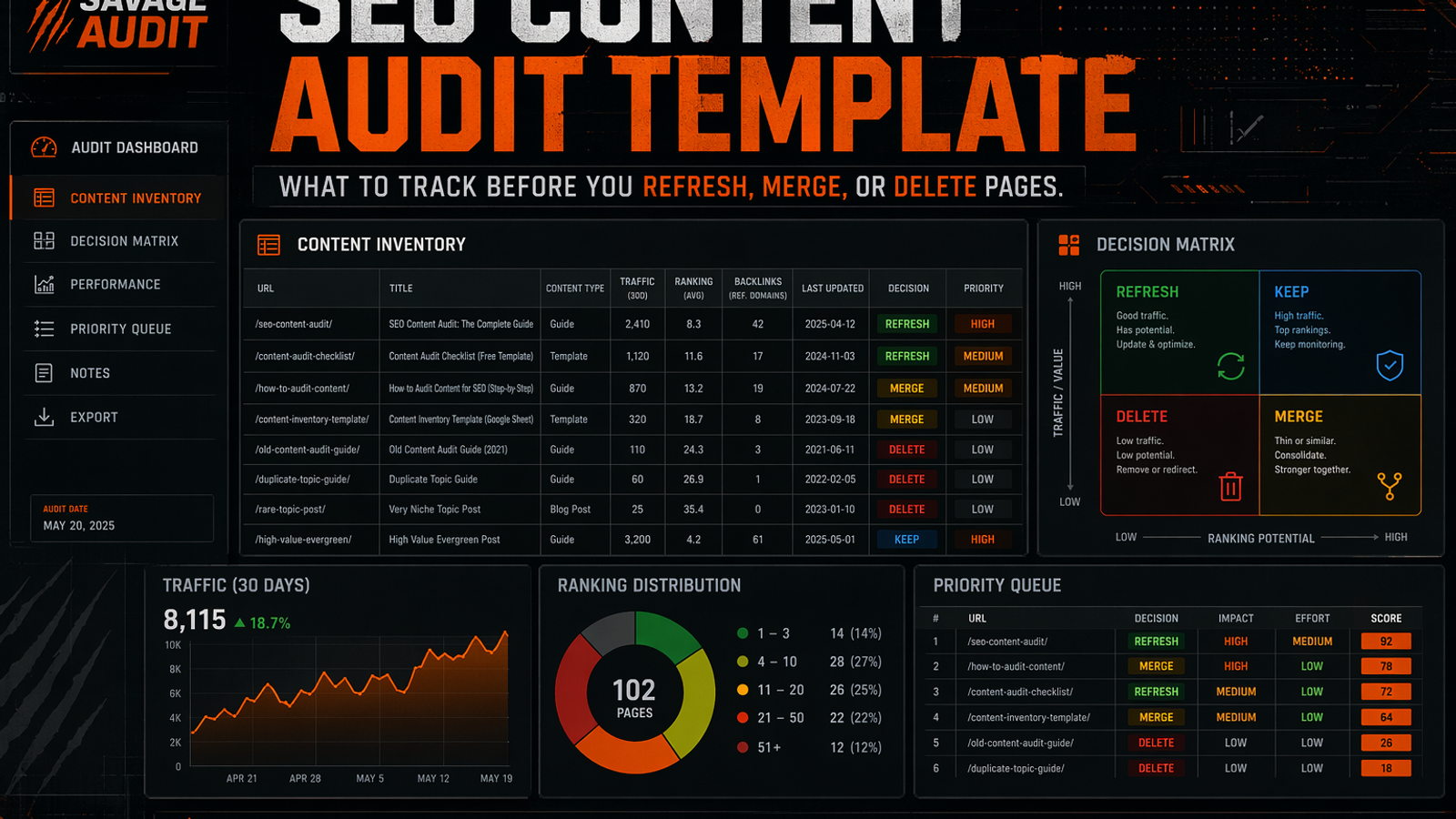
An effective SEO content audit template moves beyond a simple URL inventory by forcing concrete decisions. Instead of just tracking word counts and title tags, a decision-first spreadsheet categorizes pages by their role (money, support, proof, education) and evaluates them based on search performance, intent match, freshness, and conversion support. By tracking these specific fields, teams can confidently decide whether to keep, refresh, rewrite, merge, redirect, delete, or noindex a page, turning a static list of URLs into an actionable website audit plan.
Most content audit templates are glorified URL dumps.
They track the URL, title tag, word count, meta description, and maybe organic traffic. Then everyone gets into a meeting and argues about whether to refresh, merge pages, delete pages, or ignore the spreadsheet entirely until next quarter.
That is not an audit. That is admin work wearing an SEO costume.
A real seo content audit template forces decisions. Every row should tell your team exactly what to do next: keep, update pages, rewrite, merge, redirect, delete, noindex, or monitor.
This guide narrows that decision-first mindset into a practical spreadsheet built for SaaS, SEO, and content teams who need analysis that leads to action. If you need the step-by-step strategy to run this process, read through our content audit workflow for content teams. If you are still confusing a list of URLs with an actual analysis, start with the difference between a content inventory vs content audit.
---
The Point of an SEO Content Audit Template
A useful template answers one blunt question:
What should happen to this URL next?
That means your spreadsheet needs enough evidence to support one of these specific actions:
- Keep — the page is doing its job perfectly well.
- Refresh — the core idea is sound, but facts, proof, structure, or freshness need work.
- Rewrite — the topic is valuable, but the page fails the search intent entirely.
- Merge — another URL covers the exact same intent, and one needs to absorb the other.
- Redirect — the page should be removed and the authority sent somewhere useful.
- Delete / prune — the page has zero SEO, business, support, or conversion value.
- Noindex — the page is necessary for users (like a specific support doc) but should not compete in organic search.
- Monitor — the page is stable enough to leave alone for now, but watch its trajectory.
A content inventory says “this URL exists.” A website content audit says “this URL is leaking value, and here is how to fix it.” You need to categorize pages by their actual role—whether they are meant to drive money, offer support, provide proof, or educate—and then flag the exact problem type holding them back.
---
Add a Validation Tab Before You Touch the URLs
Most teams skip this step. Six weeks later, nobody remembers why the audit exists, and scope creep ruins the project.
Your template should include a short validation tab that records the scope, date ranges, keyword data, search demand, and cannibalization constraints. This protects the audit from vague “why are we doing this?” debates.
Use this exact kind of documentation to anchor your spreadsheet. Here is a fictional example for a SaaS company auditing a specific blog cluster:
| Field | Example Entry |
|---|---|
| Audit topic | Q3 SaaS Blog Refresh |
| Target keyword | workflow automation software |
| Priority | High (Q3 OKR) |
| Site/CMS scope | /blog/ subfolder (150 existing posts) |
| GSC date range | Jan 1, 2026 to Jun 30, 2026 |
| Keyword source | Google Ads Keyword Planner (US, English) |
| Keyword validation | 'workflow automation software' has 4,400 monthly searches |
| Existing GSC cluster | Strong impressions around 'workflow automation tools', 'automated workflows for saas', and 'workflow builder' |
| Cannibalization note | Watch out for overlap between /blog/automated-workflows and /features/workflow-builder |
| Angle constraint | Must focus on practical use cases, not generic software definitions |
That tab is not decoration. It tells your editor, SEO lead, and founder exactly why the spreadsheet exists and what constraints keep the project from spiraling out of control.
---
The Copy-Paste SEO Content Audit Template
Use these sections as your spreadsheet columns. Do not add 90 fields just because a crawler tool exported them. Spreadsheet bloat is where audits go to die.
1. URL Identification Fields
| Field | What to Track | Why It Matters |
|---|---|---|
| URL | Full page URL | Row-level source of truth. |
| Page title | Title tag or H1 | Spots outdated positioning instantly. |
| Content type | Blog, feature page, comparison, case study, docs, landing page | Different formats require different decisions. |
| Page role | Money, Support, Proof, Education, Bridge | Prevents deleting pages that support revenue indirectly. |
| Owner | Content, SEO, PMM, Product, Support | Someone has to actually fix it. |
| Last updated | Date of meaningful update | Helps identify content decay. |
| Index status | Indexed, noindexed, blocked, canonicalized | Avoids wasting time refreshing pages search engines cannot use. |
| Canonical target | Self or another URL | Flags duplicate content or consolidation issues. |
Categorize your URLs by their job: Money, Support, Proof, Education, or Bridge. That matters because a low-traffic case study might still close massive deals. A support doc might prevent costly churn. A comparison page might influence demo requests even if it does not flood your analytics dashboard.
If your template only tracks traffic, it will recommend dumb cuts.
---
2. Search Performance Fields
| Field | What to Track | Why It Matters |
|---|---|---|
| Organic clicks | Clicks from Google Search Console | Shows actual traffic captured. |
| Organic impressions | Search visibility | Shows opportunity, even if clicks are currently zero. |
| CTR | Click-through rate | Flags weak titles, boring snippets, or intent mismatch. |
| Average position | Ranking position | Finds near-page-one refresh candidates. |
| Top queries | Queries driving impressions/clicks | Shows what Google actually thinks the page is about. |
| Target query | Query the page *should* win | Exposes topic drift. |
| Query intent | Informational, commercial, comparison, navigational, branded | Guides the structure and the CTA. |
| Country/device notes | US, mobile, desktop, etc. | Useful when performance varies wildly by segment. |
Do not just dump raw metrics into your sheet. When you run a Google Search Console website audit, you have to look at how impressions, clicks, and CTR interact with search intent.
Bad audit note:
“9,000 impressions. Low clicks. Refresh?”
Better audit note:
“Page gets high impressions for ‘content audit template,’ ranks near page one, but the intro explains why audits matter instead of actually giving the template. Rework intro, add field tables, strengthen title, and link to decision sections.”
Same data. Completely different usefulness.
---
3. Freshness and Content Decay Fields
| Field | What to Track | Why It Matters |
|---|---|---|
| Freshness status | Fresh, stale, outdated, expired | Identifies the severity of content decay. |
| Outdated facts | Screenshots, pricing, product names, stats, integrations | Prevents trust damage with buyers. |
| Proof quality | None, weak, acceptable, strong | Separates generic claims from hard evidence. |
| Source quality | Recent, old, missing, unverifiable | Helps editors update the page responsibly. |
| Product accuracy | Accurate, outdated, unclear | Critical for SaaS pages where UI changes often. |
| Content depth | Thin, adequate, strong | Shows whether the page can actually compete in the SERP. |
| Readability issue | Vague, rambling, jargon-heavy, clear | Tells writers exactly what to fix in the prose. |
When evaluating content decay, look beyond the publish date. Fixing content freshness for AEO (Answer Engine Optimization) means hunting down outdated screenshots, retired integrations, dead case studies, and stale statistics.
Do not mark a page “refresh” just because the year is old. That is lazy.
A page from 2023 may still be perfectly accurate. A page from last month may already be wrong if it references old pricing tiers or a retired product UI. Track the actual freshness problem:
- Old screenshots
- Dead examples
- Outdated product UI
- Retired integration
- Old benchmark
- Broken source
- Competitor positioning changed
- Missing buyer objection
- Unsupported claim
- Vague “industry-leading” copy
If the row only says “refresh,” your writer has to redo the audit just to figure out why.
---
4. Intent Match Fields
| Field | What to Track | Why It Matters |
|---|---|---|
| Search intent match | Strong, partial, weak, wrong | Decides if you need a refresh vs a total rewrite. |
| SERP expectation | Guide, list, comparison, tool, definition, template | Shows what users expect to see when they click. |
| Current page angle | What the page promises now | Reveals the mismatch between expectation and reality. |
| Missing sections | What must be added | Makes updates highly actionable. |
| Wrong sections | What should be cut | Prevents bloated, sprawling rewrites. |
| Buyer journey stage | Awareness, consideration, decision, retention | Aligns the CTA and the proof elements. |
Intent mismatch is one of the biggest silent killers uncovered in an SEO content audit.
Example:
| Query | Current Page Problem | Correct Decision |
|---|---|---|
| content audit template | Page explains why audits matter for 2,000 words. | Restructure around fields and tables. |
| content audit tools | Page is a generic checklist of SEO concepts. | Add tool selection criteria and SaaS use cases. |
| content inventory tool | Page talks about audit strategy. | Clarify inventory vs audit and link to the right guide. |
| saas content audit | Page has no SaaS-specific roles, CTAs, or proof. | Add SaaS page roles, conversion paths, and product tie-ins. |
If your spreadsheet explicitly labels the problem—like weak intent match, vague messaging, or poor answer extraction—it shortens debate and gets the work moving.
---
5. Conversion and Business Support Fields
| Field | What to Track | Why It Matters |
|---|---|---|
| Business value | High, medium, low | Prevents SEO-only decisions that hurt revenue. |
| Conversion path | Demo, signup, trial, pricing, newsletter, internal link | Shows what action the page should naturally drive. |
| CTA quality | Clear, buried, irrelevant, missing | Identifies conversion friction. |
| Product tie-in | Strong, weak, forced, missing | Critical for SaaS content to prove ROI. |
| Assisted conversion note | Sales enablement, support deflection, proof, onboarding | Protects non-traffic value. |
| Trust signals | Reviews, logos, case studies, author, data, screenshots | Helps users believe the page's claims. |
| Internal links in | Quality and relevance of inbound links | Measures how well the site supports the page. |
| Internal links out | Links to product, proof, related content | Prevents dead-end content. |
This is where SEO-only audits get dangerous.
For example, a case study with low monthly visits may matter infinitely more than a blog post with high, irrelevant traffic if the sales team uses it to support enterprise deals. If you need software to help pull this data, look for the best content audit tool for SaaS that flags conversion friction and trust signals, not just technical errors.
Always ask:
If this page disappeared tomorrow, who would care?
If the answer is “nobody, including search users,” it is a delete candidate.
If the answer is “sales sends it every week,” protect it at all costs.
---
6. AI Extractability and Answer Readiness Fields
| Field | What to Track | Why It Matters |
|---|---|---|
| Extractable answer | Yes, partial, no | Can the page provide a clean, direct answer? |
| Clear definition | Present or missing | Helps direct-answer queries and LLMs. |
| Structured headings | Strong, weak, misleading | Improves scanning and extraction. |
| Standalone sections | Yes, partial, no | Each section should make sense on its own. |
| Entity clarity | Product, audience, category, use case clear? | Helps brand and topical understanding. |
| FAQ quality | Useful, thin, missing | Supports specific, long-tail questions. |
| Citation-worthy proof | Strong, weak, missing | Reduces generic claims that AI ignores. |
Search visibility now requires content to be answer-engine ready. That means ditching marketing fluff for current, source-worthy material. Check for clear product naming, audience-specific answers, extractable structure, and credible public proof.
Bad extractability:
“In today’s fast-moving digital landscape, businesses need robust strategies to unlock scalable growth through auditing their URLs.”
Good extractability:
“A content audit template is a spreadsheet used to evaluate each URL by search performance, intent match, freshness, business value, conversion support, and recommended action.”
One is quotable. The other is fog with punctuation.
---
7. Merge, Cannibalization, and Delete-Risk Fields
| Field | What to Track | Why It Matters |
|---|---|---|
| Overlap URL | Similar page competing for same intent | Identifies merge candidates. |
| Overlap type | Duplicate, partial, outdated, supporting | Prevents reckless consolidation. |
| Primary URL | Page that should survive | Makes the decision explicit. |
| Merge candidate | Yes/no | Flags consolidation work for the team. |
| Redirect target | Best destination if removed | Avoids dead ends and lost equity. |
| Delete risk | Low, medium, high | Protects useful but low-traffic pages. |
| Backlinks/referrals | External value | Prevents backlink equity loss. |
| Internal dependency | Does another page rely on it? | Avoids breaking user journeys. |
| Sales/support usage | Used by team or customers? | Protects business utility. |
If your site has visibility around several similar terms—like “content audit tool,” “content audit for saas,” and “saas content audit”—do not blindly merge everything. Those terms may belong to entirely different intents.
| Cluster | Likely Intent | Template Decision |
|---|---|---|
| content audit template | Wants a spreadsheet/fields | Keep this page template-focused. |
| content audit workflow | Wants process and roles | Link to the workflow guide. |
| content inventory tool | Wants inventory distinction/tooling | Link to the inventory vs audit guide. |
| content audit tools | Wants tool evaluation | Link to the SaaS tool guide. |
| website content audit | Wants broader site/content review | Include template fields but avoid generic audit sprawl. |
That is cannibalization control. It is not just “these are in the same keyword family, smash them together.”
---
Final Decision Fields
| Field | What to Track | Why It Matters |
|---|---|---|
| Recommended action | Keep, refresh, rewrite, merge, redirect, delete, noindex, monitor | The audit’s actual output. |
| Action rationale | One-sentence reason | Prevents re-litigation weeks later. |
| Priority | P1, P2, P3, backlog | Turns findings into actual work. |
| Impact | High, medium, low | Estimates upside. |
| Effort | High, medium, low | Helps sequence the work. |
| Confidence | High, medium, low | Marks certainty of the outcome. |
| DRI | Owner | Prevents orphaned tasks. |
| Due date | Date | Creates accountability. |
| Status | Not started, in progress, shipped, measured | Keeps the audit alive. |
| Measurement date | When to review impact | Avoids the “updated and vanished” problem. |
A spreadsheet is useless if it doesn't turn into a prioritized website audit action plan. You have to rank your executable fixes by business impact, confidence, and effort.
Use a simple formula:
Priority = business impact + SEO opportunity + conversion support + confidence − effort
Do not fake precision. You just need enough structure to stop circular arguments in marketing meetings.
---
Decision Rules: Refresh, Merge, Delete, or Keep
Refresh when the asset is worth saving
Refresh when:
- The topic still matters to your business.
- The page has steady impressions or rankings.
- The intent match is close, but not perfect.
- Product details, screenshots, examples, or proof are stale.
- CTR is weak but the query is highly relevant.
- The page supports conversions but needs stronger CTAs.
- The structure is not extractable enough for modern search.
Merge pages when overlap is damaging clarity
Merge when:
- Multiple URLs target the exact same intent.
- One URL is clearly stronger than the others.
- Rankings are split and cannibalizing each other.
- Internal links point inconsistently across the overlapping pages.
- One page is outdated but has a few highly useful sections.
- The surviving page can satisfy the combined intent without becoming a bloated junk drawer.
Do not merge just because two pages mention the same phrase. “Content inventory vs content audit” and “seo content audit template” are related, but they do completely different jobs for the reader.
Delete pages when they have no defensible job
Delete pages only after checking:
- Organic traffic
- Impressions
- Rankings
- Backlinks
- Internal links
- Conversions
- Sales usage
- Support usage
- Redirect options
- Strategic brand value
If a page has no SEO value, no conversion value, no support value, no proof value, and no logical redirect target, prune it.
Harsh? Good. Dead content creates internal clutter, outdated claims, and weak user journeys, especially when it remains internally linked or indexed.
Keep pages when they are doing their job
Keep means:
- The page matches search intent perfectly.
- It is highly accurate.
- It supports rankings, conversions, education, or proof.
- It has clear, extractable structure.
- It does not overlap destructively with other pages.
- It does not need meaningful work right now.
Mark it “monitor” if it is stable but important enough to keep an eye on.
---
Tools to Populate the Template
You can build the template in Google Sheets, Excel, Airtable, or your CMS. The tool matters less than the decision fields you track.
Use:
- Google Search Console for queries, pages, clicks, impressions, CTR, and average position.
- Crawler data for practical checks like indexability, canonicals, status codes, titles, headings, and internal links.
- Analytics for traffic, engagement, and conversions.
- CRM or sales notes when a page assists pipeline or sales conversations.
- CMS data for last updated date, owner, author, and content type.
- SavageAudit for a blunt, data-backed critique. It uses Lighthouse data and live internet context to expose the actual performance, SEO, copy, and UX leaks on a page, rather than just spitting out a technical checklist.
The point is not to collect every metric available on the internet. The point is to collect enough evidence to make a defensible decision.
---
Final Take
Your seo content audit template should not be a graveyard of URLs.
It should be a decision machine.
Track the fields that actually matter: traffic, rankings, intent match, conversion support, AI extractability, refresh priority, merge candidates, and delete risk. Ignore vanity columns that do not change the ultimate recommendation.
If the spreadsheet cannot tell your team what to update, merge, delete, or protect, it is not an audit. It is a content inventory with delusions of importance.
Common questions
What is an SEO content audit?
An SEO content audit is a page-by-page review of existing website content to decide what to keep, refresh, rewrite, merge, redirect, delete, noindex, or monitor. It uses search performance, intent match, freshness, business value, conversion support, and content quality to make concrete decisions.
What should a content audit template include?
A strong spreadsheet tracks the URL, page role, index status, clicks, impressions, CTR, average position, target query, intent match, freshness status, proof quality, conversion path, internal links, overlap URL, merge candidate, delete risk, recommended action, priority, owner, and status.
What is the difference between a content inventory and a content audit?
An inventory lists what exists on the site. An audit evaluates what each page is doing, how it is failing, and what should happen next. The audit is the prioritization layer that follows the inventory.
When should you update pages instead of deleting them?
Update a page when the topic still matters, the URL has search visibility or business value, and the core idea is sound, but the facts, examples, proof, or structure need to be modernized.
When should you merge pages?
Consolidate pages when multiple URLs target the exact same intent, split your rankings, duplicate sections, or confuse your internal linking structure. Choose a primary URL, pull over the best material, redirect the weaker URLs, and update all internal links.
When should you delete pages?
Prune URLs only after checking traffic, rankings, backlinks, internal links, conversions, sales usage, support usage, and redirect options. If the page has zero strategic, SEO, conversion, proof, or support value, it is a pruning candidate.
Keep the diagnosis moving
Run your own public presence audit
See how your website, search footprint, AI visibility, social proof, and conversion trust look from the outside.