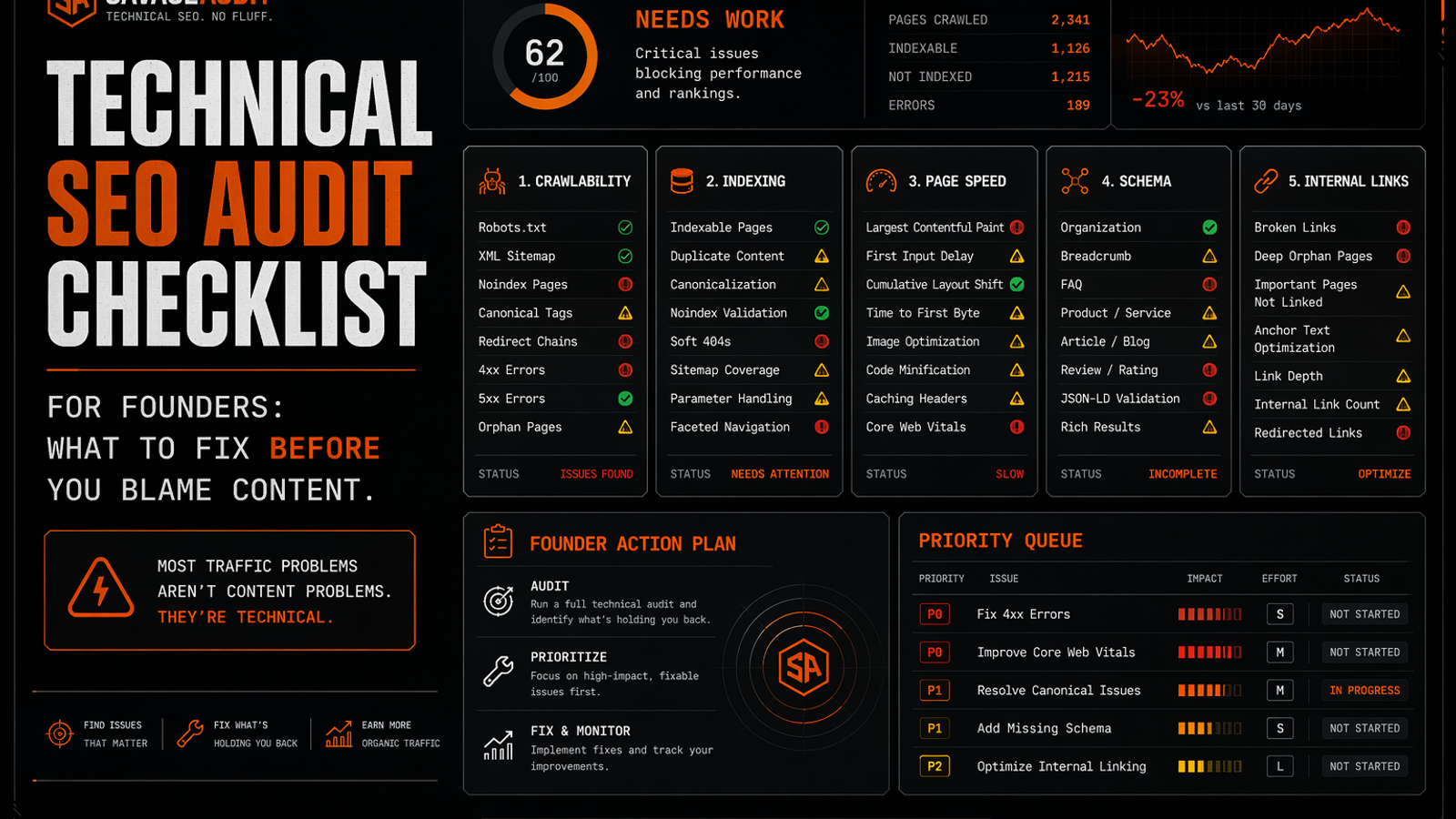
A technical SEO audit evaluates the infrastructure beneath your content, ensuring search engines can crawl, index, and render your pages. Before rewriting content to fix stalled organic growth, founders should diagnose technical blockers. This checklist covers identifying crawl issues, fixing indexing errors, untangling canonical tags, auditing internal links, measuring real-world page speed, cleaning up metadata, validating structured data, eliminating duplicate pages, mapping redirects, and reviewing mobile UX. Prioritize fixes based on business impact, starting with access and indexation on your highest-converting pages.
When organic growth stalls, lean SaaS teams usually do the same thing: rewrite the content. They draft a fresh brief, debate landing page tone, and swap out headings, assuming a quick traffic bump will follow.
But if search engines can't reliably crawl your core pages—or if your canonical tags point to staging URLs and your pricing page takes six seconds to load—the words on the page aren't the bottleneck. The underlying machinery is broken. A technical SEO audit lets you stop guessing and start diagnosing.
This checklist is for founders, marketers, and product teams who need to evaluate their search performance before burning another month on a content refresh. We will look at the structural elements that dictate whether search engines can discover, understand, and rank your site. Fix the foundation first. Then decide if the copy actually deserves the blame.
The Scope of a Technical SEO Audit
A technical SEO audit reviews the infrastructure sitting beneath your content layer. This is fundamentally different from a content audit, which looks at messaging, or an on-page SEO audit, which focuses on keyword alignment and heading structures. A technical review asks colder questions: Can Google physically reach this page? Can it render the resources? Will it index the correct version?
If you are trying to understand how these disciplines overlap, it helps to look at the difference between a standard website audit vs SEO audit. A comprehensive website audit evaluates UX, design, copy, conversion friction, and trust signals. Technical SEO is just one critical lens within that wider review—the one ensuring your site functions correctly for machines so it can eventually serve humans.
Triage Your Pages Before You Crawl
Do not run a site-wide crawl and treat every flagged issue equally. That approach leads teams to spend three weeks fixing metadata on author archive pages while core feature pages remain orphaned.
Start by isolating the URLs that actually drive revenue and evaluation. Your priority list should include the homepage, product pages, pricing, trial signups, comparison assets, and high-converting organic blog posts. You also need to look at pages that recently dropped in traffic or generate impressions but fail to earn clicks.
If you use Google Search Console, export your performance data and map your queries to their current and target URLs. Classify those queries by intent—branded, commercial, informational, comparison—and label the specific issues. Prioritize the fixes based on actual business value rather than raw impression volume. For a step-by-step breakdown of this process, run through a dedicated Google Search Console website audit.
Once your priority pages are isolated, run them through this technical SEO audit checklist.
1. Identify Crawl Issues and Blockers
If search engines cannot access a page, your content strategy does not matter. Crawl issues often stem from misconfigured robots.txt files, accidental noindex tags left over from development, or critical pages hidden behind fragile JavaScript.
Look at how your priority pages are linked to ensure they return a clean 200 OK status and are accessible through standard navigation. A common mistake founders make during a redesign is pushing the site live while staging blocks are still active. If you are preparing to go live, use a website audit checklist for startups before launch to confirm that important pages are reachable within one or two clicks.
Do not panic over blocked admin URLs or internal search parameter pages. Blocking junk is standard practice, but blocking your core use-case pages is a revenue problem.
2. Diagnose Indexing Issues
Crawlable does not automatically mean indexed, and indexed does not mean valuable. Mass indexation of low-value pages can dilute the authority of your core commercial assets.
Verify that your money pages are successfully indexed and that the URL ranking for a specific query is the one you actually want users to land on. If Google ranks a three-year-old educational blog post for a commercial product query, rewriting your main product page might not solve the problem. You likely have an intent mismatch or cannibalization issue requiring cleaner internal linking, strategic redirects, or consolidating duplicate pages.
3. Untangle Canonical Tags
Canonical tags are easy to ignore until they quietly sabotage your search visibility. They tell search engines which version of a URL is the master copy.
When marketing teams clone an existing landing page for a new paid campaign, they often update the copy but forget to change the canonical tag. As a result, the new page explicitly tells Google to ignore it in favor of the original. Check that your important pages use self-referencing canonical URLs, aligning with your XML sitemaps and internal links. Product and feature pages should never accidentally canonicalize to the homepage. Fixing canonical errors on commercial pages is one of the fastest ways to clarify your site's structure, making it a critical first step in any website audit action plan.
4. Audit Site Architecture and Internal Links
Internal links are not just a tactic to pass authority. They form the navigational map telling search engines which pages matter most.
Many SaaS blogs fall into the trap of publishing dozens of educational posts that never link back to the core product. The content becomes a dead end where readers consume the information and leave, while crawlers hit a wall. Review your internal linking structure to ensure high-traffic informational posts naturally guide users toward commercial next steps. Fix broken internal links, clean up redirect chains that force crawlers through multiple hoops, and make sure no high-value page is orphaned.
5. Measure Real-World Page Speed
Page speed is a technical SEO factor, but it fundamentally acts as a user experience issue. If your site punishes visitors with slow load times, Google notices the resulting behavioral metrics.
Look at your Largest Contentful Paint (LCP), Cumulative Layout Shift (CLS), First Contentful Paint (FCP), and Total Blocking Time (TBT). Ensure images are compressed, fonts aren't bloating the page, and third-party scripts are actually justified. A pricing page weighed down by unused animation libraries will bleed conversions long before it loses rankings. Because performance directly impacts how buyers interact with your site, viewing these metrics holistically through a combined speed, UX, and SEO audit tool approach helps translate raw data into concrete conversion improvements.
6. Clean Up Metadata and Heading Templates
While writing title tags borders on an on-page SEO audit, the way your CMS generates them is a technical issue.
Check that every indexable page has a unique title tag and a click-worthy meta description. Ensure your templates are not auto-generating duplicate titles across hundreds of URLs and that each page has a single, logical H1. If your rankings are relatively stable but your click-through rate is dropping, the problem is rarely the body copy. A website traffic loss audit often reveals that title alignment, meta descriptions, and visible trust signals in the search results are failing to capture intent. Fix the packaging before you gut the article.
7. Validate Structured Data
Clean, accurate markup helps search engines understand the specific entities and claims on your site. Check that your organization, product, and breadcrumb markup validate without major errors and accurately reflect the visible content on the page. If you use FAQ or review schema, the claims must be legitimate and visible to the user. Structured data isn't a backdoor to smuggle in keywords or fabricated ratings; it exists to clarify facts.
8. Eliminate Duplicate Pages and Index Waste
SaaS websites are notorious for generating index waste. Author archives, blog tag pages, filtered resource hubs, and dynamically generated parameter URLs quickly bloat your indexation count.
If you have three different landing pages targeting "CRM for startups," "CRM for small teams," and "CRM for growing companies" featuring near-identical copy, you are manufacturing confusion. Search engines waste crawl budget parsing these duplicates, and they end up competing against each other. Canonicalize, redirect, or noindex thin template pages.
9. Map Redirects and Fix Broken URLs
Website redesigns and domain migrations frequently leave a trail of broken URLs. When you change URL structures without mapping 301 redirects, you instantly lose the authority those old pages built.
Verify that your most important legacy URLs redirect directly to their most relevant modern counterparts. Avoid redirect chains where page A points to page B, which points to page C. Clean up any 404 errors on pages that currently have external backlinks pointing to them.
10. Review Mobile UX and the Conversion Path
Technical SEO doesn't end when the crawler successfully indexes the page. If a mobile user lands on your site and cannot navigate the menu, tap the primary call-to-action, or fill out the demo form because the layout shifted, your technical foundation has failed the business. Ensure important content isn't hidden behind broken accordions, forms function seamlessly on mobile devices, and trust signals render correctly near decision points.
How to Prioritize Your Audit Findings
A technical SEO audit checklist is useless if it simply results in a 100-page PDF filed in a shared drive. You need to sequence the work based on dependencies and business impact.
Start with access and indexation. If Google cannot access or index the right URLs, nothing else matters. You should immediately fix robots.txt blocks on important pages, accidental noindex tags, canonical errors on revenue pages, and broken migration redirects.
Once the site is accessible, ensure crawlers and users have logical paths to follow by fixing orphan product pages and repairing broken internal links. Connect high-traffic blog posts to commercial landing pages.
From there, focus engineering time on the performance of critical templates. Improve the mobile load times and layout stability of your homepage, pricing page, and signup flows before worrying about optimizing legacy blog templates. Finally, with the core infrastructure stable, you can clean up duplicate title tags, implement structured data, and consolidate low-value indexed pages.
When Content Actually Is the Problem
There are times when the technical foundation is solid and the content is genuinely at fault. You should rewrite or expand a page when the content clearly targets the wrong search intent, when the title promises an answer the page fails to deliver, or when competitors simply provide better proof and clearer comparisons.
If your positioning is vague or the page is wildly outdated, a rewrite is justified. But you can only make that determination after confirming the page can be crawled, indexed, loaded, and navigated. More words are not a strategy. Often, they just create more surface area for mediocrity.
Get a Fast Baseline with SavageAudit
Before investing in enterprise crawling software or weeks of developer time, get a reality check on your site's current state.
SavageAudit provides an AI-powered website audit that evaluates your site across six core categories: Performance, SEO, Design, Copy, UX, and Conversion. The tool uses real Lighthouse-based metrics—including LCP, CLS, FCP, and TBT—to measure performance. It also checks fundamental SEO elements like metadata and heading structures, layering in live internet context for a sharper, personalized critique.
You don't need to sign up or enter a credit card to use it. Simply paste any public URL and receive a data-backed verdict in about 60 seconds, which you can export as a screenshot to share with your team.
While it won't replace a deep log-file analysis or a comprehensive engineering review, SavageAudit instantly exposes the obvious technical and user-experience failures your team may have normalized. Find the immediate blockers, then dive into Google Search Console and your deployment history to execute the fixes.
Common questions
What is a technical SEO audit?
A technical SEO audit is a structured evaluation of the systems that dictate whether search engines can crawl, index, understand, and rank your website. It covers infrastructure elements like crawl access, canonical logic, page speed, internal linking, structured data, and mobile usability.
How is a technical SEO audit different from an on-page SEO audit?
An on-page SEO audit focuses on what the content says—analyzing title tags, heading hierarchy, keyword alignment, and copy structure. A technical SEO audit focuses on how the site functions, ensuring search engines can actually reach, render, and process that content.
Should I fix technical SEO before rewriting content?
Yes. If a page suffers from crawl blockers, indexing errors, broken canonical tags, or severe mobile performance issues, rewriting the copy is a waste of resources. Fix the infrastructure so search engines can access the page before spending time optimizing the message.
What are the most common technical SEO issues for SaaS founders?
Lean SaaS teams frequently struggle with accidental noindex tags, broken internal links, duplicate template pages, canonical errors on cloned campaign pages, messy redirects following a site redesign, and educational blog posts that fail to link back to the core product.
Keep the diagnosis moving
Run your own public presence audit
See how your website, search footprint, AI visibility, social proof, and conversion trust look from the outside.